Excel Tips & Tutorials

Step-by-step Excel guides, formulas, and tips. New tutorials added regularly.

How to Copy Column Widths in Excel (Shortcut)

Column width copied

When you copy a cell or range of cells in Excel and paste it somewhere else, it pastes the entire content of the cells, including the formatting. But do you know that you can also copy the column width? Excel allows you to copy cells and paste selectively (such as only pasting the values or …

Read more

10 Excel Pivot Table Keyboard Shortcuts

10 Excel Pivot Table Keyboard Shortcuts

Pivot tables are used by hundreds of thousands of people every day to analyze and summarize large amounts of data. Pivot Tables are fairly easy to use, and most Excel users get the hang of it after using it a couple of times. So if you’re a fan of Pivot Tables and use them quite …

Read more

Formula vs Function in Excel – What’s the Difference?

Formula vs Function in Excel - What's the Difference

Many Excel users use the terms ‘Formula’ and ‘Function’ interchangeably. While this does no harm in most cases, it’s good to have a proper understanding of what a formula is and what a function is in Excel. And, of course, it is going to give you a lot of opportunities to correct others and brag …

Read more

Row vs Column in Excel – What’s the Difference?

Row vs Column in Excel - What's the Difference

While this may be a basic question for many Excel users, I have been asked multiple times about the difference between rows and columns in Excel. While one obvious difference is the placement of the row versus column in Excel, there is more to it. In this article, I will cover the differences between rows …

Read more

How to Add Week to Date in Excel?

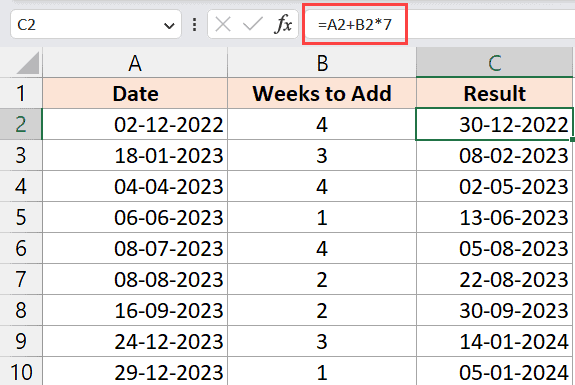
Formula to add week in a column to date in Excel

It’s a common requirement to calculate the date after a specific number of weeks from the current date or any other given date. This is especially helpful while planning a project where you have a tentative idea of how much time a task would take and want to know when it will be completed (by …

Read more

How to Compare Text in Excel (Easy Formulas)

EXACT formula to compare text in Excel

Excel users often need to compare cells or columns to check if the same text is available in the cells/columns or not. A very common example of this is when you have names in two columns and you want to check if the names are exactly the same or what names are missing in one …

Read more

Delete Blank Columns in Excel (3 Easy Ways + VBA)

All blank columns are selected

When I was working as a data analyst years ago, part of my job was to download data from financial databases and then clean this data. And one of the things I had to do while cleaning the data was to delete any blank columns in the data set. While you can always manually select …

Read more

How to Sort by Length in Excel? Easy Formulas!

SORTBY function to sort by length in Excel

Excel allows you to sort your data set based on numeric values, text values, dates, as well as colors in the cell. However, there is no inbuilt functionality in Excel to sort the cells based on the length of the text in the cells. In one of my Excel training sessions, I was asked whether …

Read more

How to Convert Text to Date in Excel (8 Easy Ways)

Select Short or Long date format

Working with dates is a common task for many Excel users. And sometimes, you can come across dates that are formatted as text (or look like dates but are not in the acceptable date formats, so Excel treat them as text strings). Since dates are stored as numbers in the backend in Excel, it allows …

Read more

Get the FREE 51 Excel Tips Ebook

Enter your details and the free PDF is on its way to your inbox.

Hmm, that didn't go through. Please check your email and try again.

No spam. You'll also get my weekly Excel newsletter. Unsubscribe anytime.

Check your inbox!

The ebook is on its way to your email. It usually lands within a couple of minutes.