Excel Tips & Tutorials

Step-by-step Excel guides, formulas, and tips. New tutorials added regularly.

Convert Scientific Notation to Number or Text in Excel

TRIM formula to show large numbers

If you enter a number that has more than 11 digits in a cell in Excel, it will automatically be converted into the scientific notation (as shown below). While the number in the back end would still remain the same, Excel changes the way it shows you that number. Sometimes that’s what you want, and …

Read more

Remove Characters From Left in Excel (Easy Formulas)

Formula to remove all text from the left

Cleaning text data is often the most time-consuming task for many Excel users. Unless you’re among the few lucky ones, you’ll most likely get your data in a format that would need some cleaning. One common use case of this would be when you get a dataset and you have to remove some characters from …

Read more

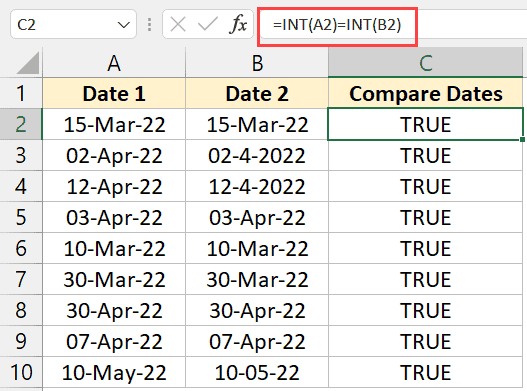
How to Compare Dates in Excel (Greater/Less Than, Mismatches)

Comparing Dates using the INT formula

One area that often troubles Microsoft Excel users is working with dates. This is mostly because dates can be formatted in many different ways in Excel. So while you may see two dates in Excel and think those are the same, there is a possibility that these might be different values in the back end …

Read more

Copy and Paste Multiple Cells in Excel (Adjacent & Non-Adjacent)

Excel allows copying non-adjacent cells in the same row

Copying and Pasting a cell or a range of cells is one of the most common tasks users do in Excel. A proper understanding of how to copy-paste multiple cells (that are adjacent or non-adjacent) would really help you be a lot more efficient while working with Microsoft Excel. In this tutorial, I will show …

Read more

How to Multiply a Column by a Number in Excel

Entire column multiplied with the same value

Although Excel is a powerful data analysis tool, many users use it for basic arithmetic operations. One common requirement is to multiply an entire column by a number (a constant value). In this tutorial, I will show you two easy ways to multiple an entire column with a given number. So let’s get to it! …

Read more

Get the FREE 51 Excel Tips Ebook

Enter your details and the free PDF is on its way to your inbox.

Hmm, that didn't go through. Please check your email and try again.

No spam. You'll also get my weekly Excel newsletter. Unsubscribe anytime.

Check your inbox!

The ebook is on its way to your email. It usually lands within a couple of minutes.