Excel Tips & Tutorials

Step-by-step Excel guides, formulas, and tips. New tutorials added regularly.

Move Pivot Table to Different Worksheet or Workbook (Easy Steps)

Click on Move Pivot Table Option

Pivot tables are very easy to create and even easier to move to some other worksheet or a new worksheet in the same Excel workbook. Many Excel users often end up creating multiple Pivot tables in the same worksheet, which is not a very organized way of doing things. But thanks to a readily available …

Read more

Best Shortcuts to Fill Color in Excel (Basic & Advanced)

Select the color you want to fill

Filling a background color in a cell or range of cells is a common task that most of Excel users have to do on a daily basis. While it’s quite easy to fill color in a cell in Excel (using the inbuilt option in the ribbon), it’s not the fastest way to do it. And …

Read more

Using Active Cell in VBA in Excel (Examples)

Active cell address is shown in the name box

‘Active Cell’ is an important concept in Excel. While you don’t have to care about the active cell when you’re working on the worksheet, it’s an important thing to know when working with VBA in Excel. Proper use of the active cell in Excel VBA can help you write better code. In this tutorial, I …

Read more

Separate Text and Numbers in Excel (4 Easy Ways)

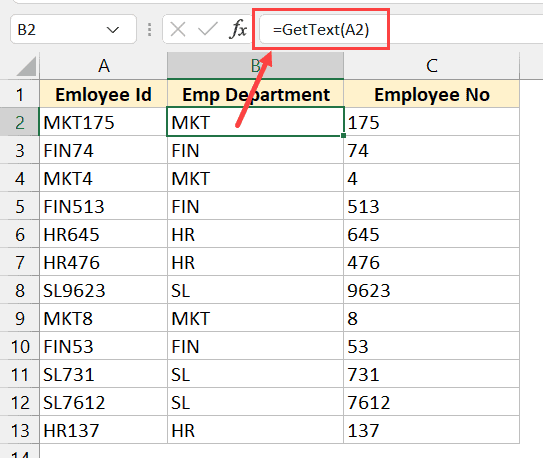
GETTEXT formula

Sometimes you may have the text and numeric data in the same cell, and you may have a need to separate the text portion and the number portion in different cells. While there is no inbuilt method to do this specifically, there are some Excel features and formulas you can use to get this done. …

Read more

How to Autofill Only Weekday Dates in Excel (Formula)

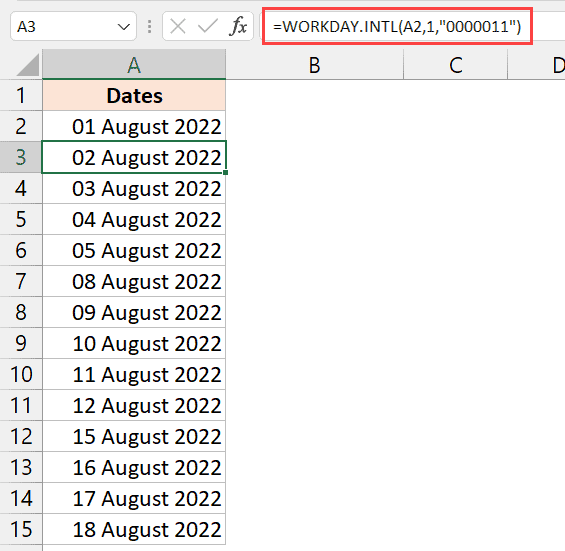
Formula to get weekdays only in Excel

While working with dates in Excel, you may have a need to fill a column only with the dates that occur on a weekday. This is usually needed when you’re creating a project plan, where only the weekday dates can be used, and the weekend dates are holidays. In this short tutorial, I am going …

Read more

How To Convert Date To Serial Number In Excel?

Select the Number category

There are multiple ways you can display a number in a cell in Excel. And one of the ways you can format a number is to show it as a date (for that corresponding serial number) When you see a date in a cell in Excel, in the back end it is still stored as …

Read more

Excel Tabs/Sheets Not Showing – How to Fix?

Select Advanced in the Excel options dialog box

The default setting in Excel is to show all the tabs (also called sheets) below the working area. But if you can’t see any tabs and are wondering where has it disappeared, worry not. There are some possible reasons that may have been the cause of missing tabs in your Excel workbook. In this article, …

Read more

How to Switch Between Sheets in Excel?

Watch Window Docked below the ribbon

Working with a large Excel workbook that has multiple sheets could be challenging. Even advanced Excel users feel overwhelmed when trying to switch between multiple worksheets in the same workbook. Imagine working on an Excel workbook with 15 worksheets, and having to constantly switch between worksheets #3 and #12. There are multiple ways to switch …

Read more

Excel Quick Analysis Tool – How to Best Use it?

Click on running total

Excel Quick Analysis Tool allows you to quickly analyze data. It gives you quick access to some of the commonly used data analysis functionalities in Excel so that you don’t have to go into the ribbon and find the correct option (hence saving some clicks and a little bit of time). In this tutorial, I …

Read more

Get the FREE 51 Excel Tips Ebook

Enter your details and the free PDF is on its way to your inbox.

Hmm, that didn't go through. Please check your email and try again.

No spam. You'll also get my weekly Excel newsletter. Unsubscribe anytime.

Check your inbox!

The ebook is on its way to your email. It usually lands within a couple of minutes.