Excel Tips & Tutorials

Step-by-step Excel guides, formulas, and tips. New tutorials added regularly.

How to Split Screen in Excel (Compare Side-by-Side)

Drag the gray lines to make the split screen go away

Excel has some really useful features that can help you be a lot more efficient in your day-to-day work. One of the common tasks many people have to do is to compare data in the same sheet. This is especially useful for people who work with large data that requires a lot of back and …

Read more

Count Sheets in Excel (using VBA)

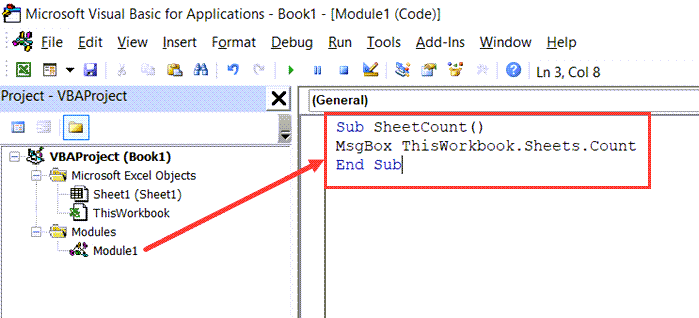
Copy and Paste the code to the module code window

There are some simple things that are not possible for you to do with in-built functions and functionalities in Excel, but can easily be done using VBA. Counting the total number of sheets in the active workbook or any other workbook on your system is an example of such a task. In this tutorial, I’ll …

Read more

How to Convert Inches to MM, CM, or Feet in Excel? Easy Formula

Convert Inches to CM formula

If you work with measurement data and there is a need to convert the data from one length measurement unit to another, you can use some inbuilt formulas in excel to do that. For example, you may have a need to convert data in centimeters/millimeters to inches or feet. In this short tutorial, I will …

Read more

How to Move Chart to New Sheet in Excel? 2 Easy Ways!

Data with Chart that needs to be moved

By default, when you insert a chart in Excel, it’s created in the same worksheet where you have the source dataset. But in many cases, you may want to move the chart from the sheet where it’s created to another worksheet (or a chart sheet – which has nothing but the chart). This can be …

Read more

Get Day Name from Date in Excel (Easy Formulas)

Cell still has the date in the backend

When working with dates in Excel, sometimes you may want to know what day the date is (whether it’s a Monday or a Tuesday, or any other weekday). This could especially be useful in project planning, where some days could be for a specific task (such as having a project meeting or sending the progress …

Read more

How to Get Descriptive Statistics in Excel? (Quick and Easy)

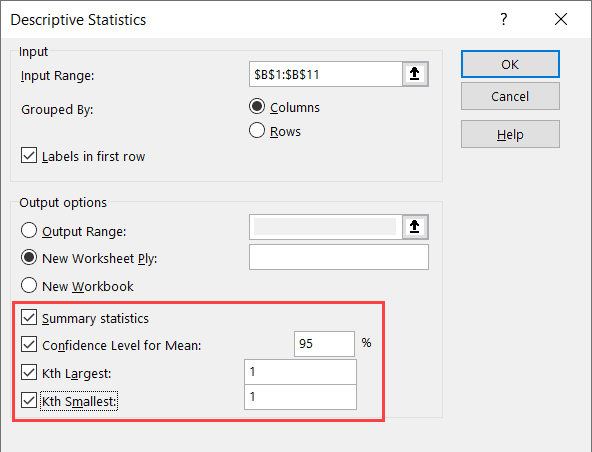
Select the statistics you want in the report

If you’re working with large datasets in excel, getting Descriptive Statistics for this data set could be useful. Descriptive Statistic quickly summarizes your data and gives you a few data points that you can use to quickly understand the entire data set. While you can also calculate each of these statistical values individually, using the …

Read more

How to Enable Macros in Excel? Everything You Must Know!

Click on Advanced option

Macros in Excel are a game-changer if you have to deal with repetitive tasks. Macros allow you to automate many time-consuming tasks and also create some functions and functionalities that are not already built-in in Excel. As a part of the security measure, if you receive a file that has a macro, Excel will disable …

Read more

Calculate Area Under Curve in Excel (2 Easy Ways)

Area Under Curve Chart Logic explained

Area Under Curve (AUC) is a widely used concept in data sciences in multiple fields. While the concept of Area Under Curve is quite simple – which is to calculate the total area covered between the curve/line and the axis – there is no direct way to calculate this in Excel. But it isn’t too …

Read more

Get the FREE 51 Excel Tips Ebook

Enter your details and the free PDF is on its way to your inbox.

Hmm, that didn't go through. Please check your email and try again.

No spam. You'll also get my weekly Excel newsletter. Unsubscribe anytime.

Check your inbox!

The ebook is on its way to your email. It usually lands within a couple of minutes.