TEXTSPLIT Function in Excel

TEXTSPLIT Function in Excel

If you want to break a piece of delimited text into separate pieces, like splitting a code at each pipe or a list at each comma, the TEXTSPLIT function is what you’re looking for. You give it the text and the character to split on, and it does the rest. TEXTSPLIT is a dynamic array …


Read more

UNIQUE Function in Excel

UNIQUE Function in Excel

If you want a clean list of distinct values from a column full of repeats, the UNIQUE function is what you’re looking for. You point it at a range and it hands back one of each value. You don’t need the Remove Duplicates dialog, and your original data stays untouched. UNIQUE is a dynamic array …

Read more

LINEST Function in Excel

LINEST Function in Excel

If you want to fit a straight line to your data and get the slope, the intercept, and how good the fit actually is, the LINEST function is what you’re after. It runs a least-squares regression and hands back the numbers behind the line. LINEST returns a whole array of numbers, not just one. In …

Read more

LOOKUP Function in Excel

LOOKUP Function in Excel

If you want to find a value in a sorted row or column and pull back the matching item next to it, the LOOKUP function does exactly that. It hunts for your value, and when there’s no exact hit, it settles on the largest value that isn’t bigger than what you asked for. In Excel …

Read more

INDEX MATCH with Multiple Criteria in Excel

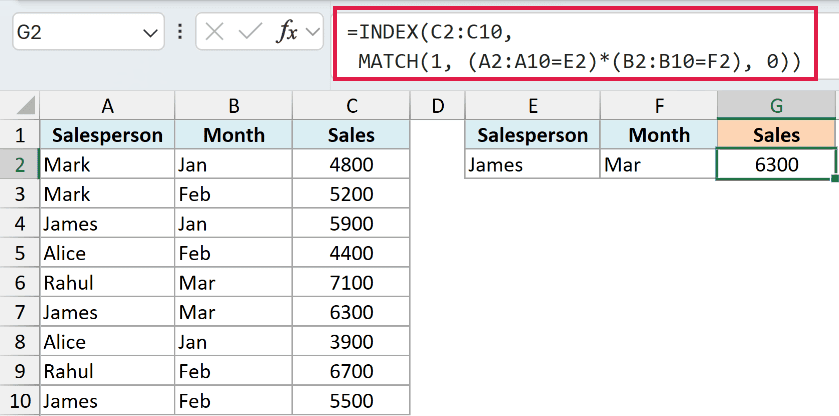
INDEX MATCH array formula with two criteria entered in the result cell, returning the sales value where both the salesperson and the month match

If you want to look up a value using two or more conditions at once, a regular lookup won’t get you there. It can only match on a single column, so the moment two rows share the same name (or the same month), it just grabs the first one it finds. The fix is to …

Read more

How to Use IF Function with OR in Excel

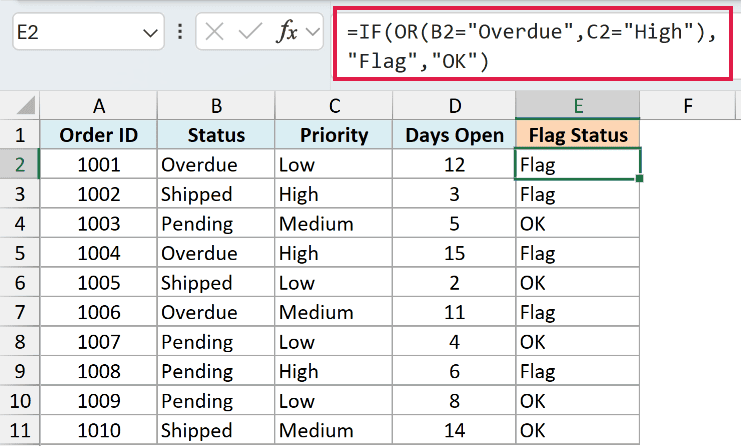
IF function with OR in Excel showing Flag for orders that are overdue or high priority and OK for the rest

The IF function is one of the most useful functions in Excel. You give it a condition to check, and it gives you one result when that condition is met and a different result when it isn’t. Simple idea, and you end up using it everywhere. But a single IF can only check one condition …

Read more

List.Max Function in Power Query M

list.max power query

If you want to find the largest value in a list in Power Query, the List.Max function is the quickest way to do it. It takes a list of values and hands you back the single biggest one. In this article, I’ll walk you through List.Max with practical examples, from finding the highest number and …

Read more

EXPAND Function in Excel

EXPAND Function in Excel

If you want to grow an array to a set number of rows or columns and fill the extra cells with a value of your choice, the EXPAND function is what you’re looking for. EXPAND is a dynamic array function, so it spills its results across the cells below and to the right. In this …

Read more

Table.Combine Function in Power Query M

table.combine power query

The Table.Combine function stacks multiple tables into one by appending their rows. It matches columns by name, so the column order in each table doesn’t matter, and any column that’s missing from one table is filled with null. This is the M function behind the Append Queries feature, and writing it yourself gives you a …

Read more

Get the FREE 51 Excel Tips Ebook

Enter your details and the free PDF is on its way to your inbox.

Hmm, that didn't go through. Please check your email and try again.

No spam. You'll also get my weekly Excel newsletter. Unsubscribe anytime.

Check your inbox!

The ebook is on its way to your email. It usually lands within a couple of minutes.