Excel Tips & Tutorials

Step-by-step Excel guides, formulas, and tips. New tutorials added regularly.

How to SORT in Excel (by Rows, Columns, Colors, Dates, & Numbers)

Sort Data by color - result

Sorting data in Excel has been made quite easy with all the in-built options. You can easily sort your data alphabetically, based on the value in the cells, or by cell and font color. You can also do multi-level column sorting (i.e., sorting by column A and then by column B) as well as sorting …

Read more

How to Make a PIE Chart in Excel (Easy Step-by-Step Guide)

Creating Pie Chart in Excel

Excel has a variety of in-built charts that can be used to visualize data. And creating these charts in Excel only takes a few clicks. Among all these Excel chart types, there has been one that has been a subject of a lot of debate over time. …the PIE chart (no points for guessing). Pie …

Read more

How to Sort By Color in Excel (in less than 10 seconds)

Sort by multiple colors - select Green in the drop down

Excel has a lot of options when it comes to sorting data. And one of those options allows you to sort your data based on the color of the cell. For example, in the below dataset, you can sort by color to get the names of all the students who scored above 80 together at …

Read more

How to Add a Secondary Axis in Excel Charts (Easy Guide)

Secondary Axis in the Chart

Excel charts allow you to do a lot of customizations that help in representing the data in the best possible way. And one such example of customization is the ease with which you can add a secondary axis to Excel charts. But before I get into the mechanics of adding a secondary axis, let me …

Read more

Hyperlinks in Excel (A Complete Guide + Examples)

Hyperlink Formula to get the result

Excel allows having hyperlinks in cells which you can use to directly go to that URL. For example, below is a list where I have company names which are hyperlinked to the company website’s URL. When you click on the cell, it will automatically open your default browser (Chrome in my case) and go to …

Read more

How to Quickly Unhide COLUMNS in Excel (A Simple Guide)

If you prefer written instruction instead, below is the tutorial. Hidden rows and columns can be quite irritating at times. Especially if someone else has hidden these and you forget to unhide it (or even worse, you don’t know how to unhide these). While I can’t do anything about the first issue, I can show …
Read more

INDEX & MATCH Functions Combo in Excel (10 Easy Examples)

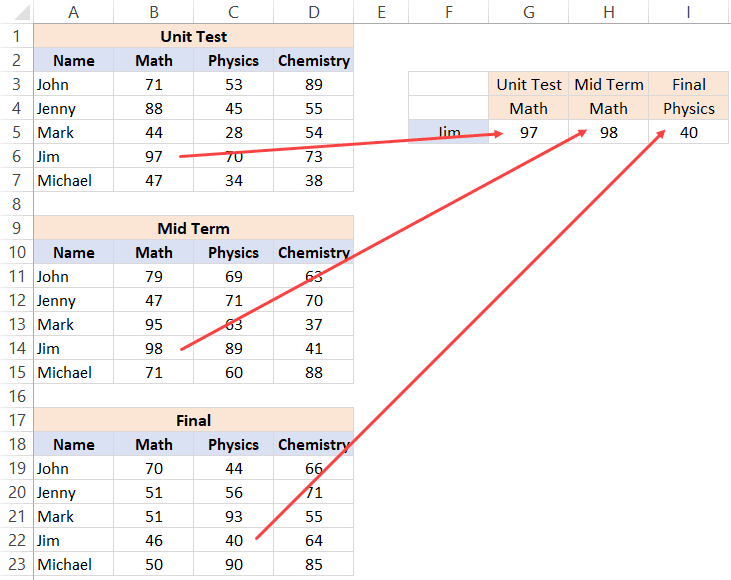
Three Way Lookup - Result using INDEX MATCH

Excel has a lot of functions – about 450+ of them. And many of these are simply awesome. The amount of work you can get done with a few formulas still surprises me (even after having used Excel for 10+ years). And among all these amazing functions, the INDEX MATCH functions combo stands out. I …

Read more

Get the FREE 51 Excel Tips Ebook

Enter your details and the free PDF is on its way to your inbox.

Hmm, that didn't go through. Please check your email and try again.

No spam. You'll also get my weekly Excel newsletter. Unsubscribe anytime.

Check your inbox!

The ebook is on its way to your email. It usually lands within a couple of minutes.