Row vs Column in Excel – What’s the Difference?

Row vs Column in Excel - What's the Difference

While this may be a basic question for many Excel users, I have been asked multiple times about the difference between rows and columns in Excel. While one obvious difference is the placement of the row versus column in Excel, there is more to it. In this article, I will cover the differences between rows …

Read more

How to Compare Text in Excel (Easy Formulas)

EXACT formula to compare text in Excel

Excel users often need to compare cells or columns to check if the same text is available in the cells/columns or not. A very common example of this is when you have names in two columns and you want to check if the names are exactly the same or what names are missing in one …

Read more

Delete Blank Columns in Excel (3 Easy Ways + VBA)

All blank columns are selected

When I was working as a data analyst years ago, part of my job was to download data from financial databases and then clean this data. And one of the things I had to do while cleaning the data was to delete any blank columns in the data set. While you can always manually select …

Read more

How to Convert Text to Date in Excel (8 Easy Ways)

Select Short or Long date format

Working with dates is a common task for many Excel users. And sometimes, you can come across dates that are formatted as text (or look like dates but are not in the acceptable date formats, so Excel treat them as text strings). Since dates are stored as numbers in the backend in Excel, it allows …

Read more

Highlight Dates Before Today in Excel

Entire row has been highlighted

A lot of people use dates in Excel for planning and keeping track of tasks and activities. For example, below I have a data set where I have the tasks in column A and their due dates in column B. It would be useful if there was a way to automatically highlight dates before today, …

Read more

How to Make a Yes/No Drop-Down in Excel? (Easy Ways)

Drop down shows up in the selected cell

If you want to fill a column with Yes or No answers, typing them by hand gets slow, and someone will eventually make a mistake and type “yes ” or “Y”. A Yes/No drop-down list fixes this. You simply pick Yes or No from the list, so there’s no room for misspelled words. In this …

Read more

Separate Text and Numbers in Excel (4 Easy Ways)

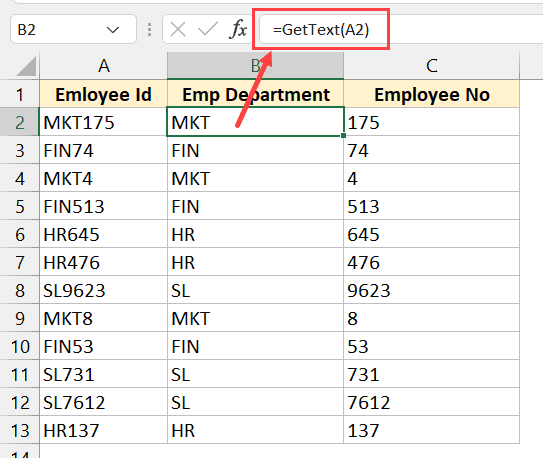
GETTEXT formula

If you want to separate text and numbers in Excel, there isn’t a built-in one-click feature for this specific job. For example, you may need to split MKT175 into MKT and 175 in different columns. But there are features and formulas that can do this, and in this tutorial, I’ll show you four easy ways. …

Read more

Excel Quick Analysis Tool – How to Best Use it?

Click on running total

Excel Quick Analysis Tool allows you to quickly analyze data. It gives you quick access to some of the commonly used data analysis functionalities in Excel so that you don’t have to go into the ribbon and find the correct option (hence saving some clicks and a little bit of time). In this tutorial, I …

Read more

Get the FREE 51 Excel Tips Ebook

Enter your details and the free PDF is on its way to your inbox.

Hmm, that didn't go through. Please check your email and try again.

No spam. You'll also get my weekly Excel newsletter. Unsubscribe anytime.

Check your inbox!

The ebook is on its way to your email. It usually lands within a couple of minutes.