Text to Columns in Excel – 7 Examples

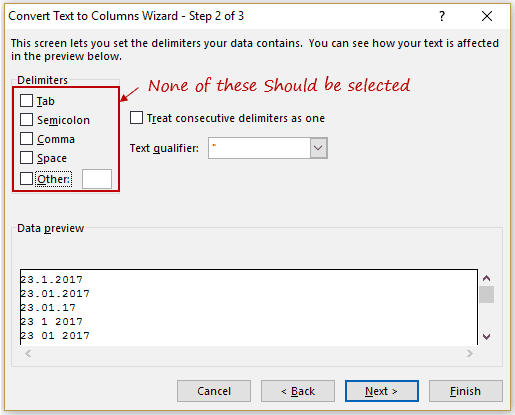
Text to Columns is an amazing feature in Excel that deserves a  lot more credit than it usually gets. As it’s name suggests, it is used to split the text into multiple columns. For example, if you have a first name and last name in the same cell, you can use this to quickly split these into two …

Read more

How to Calculate Compound Annual Growth Rate (CAGR) in Excel

If you’re into and financial planning or analysis, you must have heard about the Compound Annual Growth Rate (or CAGR). In this tutorial, you’ll learn different ways to calculate the CAGR in Excel: But before we dive into how to calculate CAGR in Excel, let’s first understand what it means (feel free to skip this …

Read more

How to Add Leading Zeros in Excel (5 Easy Ways)

There are situations when you need to add leading zeroes to a dataset in Excel. This could be the case if you maintain records in Excel, such as Employee Ids or Transaction Ids. For example, you may want to get a consistent look in your data set as shown below: In this tutorial, you’ll learn …

Read more

How to Make Negative Numbers Show Up in Red in Excel

If you work with a lot of numbers in Excel, it’s a good practice to highlight negative numbers in red. This makes it easier to read the data. There are various techniques you can use to highlight negative numbers in red in Excel: Let’s explore each of these techniques in detail. Highlight Negative Numbers in …

Read more

How to Quickly Insert Date and Timestamp in Excel

A timestamp is something you use when you want to track activities. For example, you may want to track activities such as when was a particular expense incurred, what time did the sale invoice was created, when was the data entry done in a cell, when was the report last updated, etc. Let’s get started. …

Read more

How to Rank within Groups in Excel

If you have a list of numbers, it easy to rank it using the RANK function. However, if you have these numbers within various groups, it could be a challenge to find the rank within the groups. For example, as shown below, there are two groups (A and B) with 5 items in each group. Each item …

Read more

How to Quickly Find Hyperlinks in Excel (using Find and Replace)

If you have a lot of hyperlinks and these are scattered in the worksheet, it could be a herculean task to find these. Doing it manually can take you forever. In this tutorial, you’ll learn how to quickly: Find All Hyperlinks in Excel Suppose you have a dataset as shown below: Using Find and Replace …

Read more

Get the FREE 51 Excel Tips Ebook

Enter your details and the free PDF is on its way to your inbox.

Hmm, that didn't go through. Please check your email and try again.

No spam. You'll also get my weekly Excel newsletter. Unsubscribe anytime.

Check your inbox!

The ebook is on its way to your email. It usually lands within a couple of minutes.