
The COUPDAYSNC function in Excel returns the number of days from a bond’s settlement date to its next coupon date. A coupon is a scheduled interest payment, and settlement is when the purchase is completed.
The answer follows the bond’s day-count convention, so it isn’t always the number of calendar days you’d count on a calendar.
In this article, I’ll show you how to calculate the days remaining, compare payment frequencies and day-count bases, and handle settlement on a coupon date. COUPDAYSNC doesn’t spill results from a plain range, so we’ll copy the formula down when comparing several cases.
Follow along with the example file
COUPDAYSNC Function Examples.xlsx
COUPDAYSNC Function Syntax
Here is the syntax of the COUPDAYSNC function:
=COUPDAYSNC(settlement, maturity, frequency, [basis])
- settlement – Required. The date the bond purchase is completed. Enter a reference to a cell containing a real Excel date.
- maturity – Required. The date the bond reaches the end of its term. Excel uses this date and the payment frequency to work backward through the coupon schedule.
- frequency – Required. The number of coupon payments per year: 1 for annual, 2 for semiannual, or 4 for quarterly payments.
- basis – Optional. The convention Excel uses to count days. If you leave it out, Excel uses 0, the US 30/360 convention.
The basis codes are:
| Basis | Day-count convention |
|---|---|
| 0 or omitted | US (NASD) 30/360 |
| 1 | Actual/actual |
| 2 | Actual/360 |
| 3 | Actual/365 |
| 4 | European 30/360 |
Excel drops the decimal part of every argument. For dates, that removes any time of day; for frequency and basis, enter the whole-number codes shown above rather than relying on truncation.
COUPDAYSNC is available in Excel for Microsoft 365, Excel 2024, 2021, 2019, and 2016, including supported Mac versions.
When to Use the COUPDAYSNC Function
Use this function when you need to:
- Calculate the days remaining until the next scheduled interest payment on a regular coupon bond.
- Compare how payment frequency changes the next coupon after settlement.
- Check a day count using the convention specified for a bond.
COUPDAYSNC assumes a regular coupon schedule derived from maturity. A bond with an unusually short or long first or last coupon period needs separate handling because this function has no argument for those irregular dates.
Let me show you how the calculation works with four examples.
Example 1: Find Days to the Next Coupon
Let’s start with one bond that pays interest twice a year.
Below are the inputs for a bond purchased on May 18, 2026, and I want to calculate the days to its next coupon in cell B8.
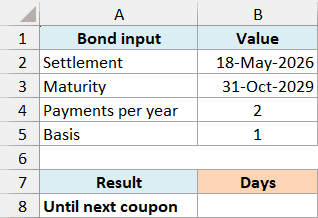
On the Next Coupon sheet, enter this formula in B8:
=COUPDAYSNC(B2,B3,B4,B5)
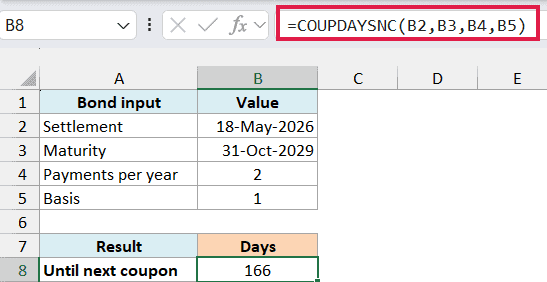
The formula returns 166. It uses May 18, 2026 as settlement, October 31, 2029 as maturity, two payments per year, and basis 1 for actual days.
With this maturity date and semiannual schedule, coupon dates fall at the end of April and October. The next coupon after May 18, 2026 is October 31, 2026, which is 166 days away.
Notice that you don’t need to supply the next coupon date yourself. The maturity date and frequency give Excel enough information to find it for a regular schedule.
If a date is stored as text, Excel may misread it or return #VALUE!. Use real date cells, or create the date with the DATE function using separate year, month, and day numbers.
The settlement date must be earlier than maturity. If the two dates are equal, or settlement comes later, COUPDAYSNC returns #NUM! because there is no later coupon to count toward.
Example 2: Compare Payment Frequencies
The number of payments per year affects which coupon date comes next.
Below are three payment schedules for a bond with the same settlement and maturity dates, and I want to compare the days to the next coupon in column C.

On the Payment Frequency sheet, enter this formula in C2 and copy it down through C4:
=COUPDAYSNC($F$2,$F$3,B2,$F$4)
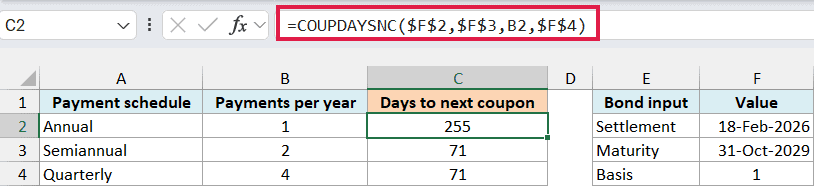
The absolute cell references keep the settlement, maturity, and basis fixed as you copy the formula. B2 changes to B3 and B4, so each row uses its own payment frequency.
With settlement on February 18, 2026, the annual schedule returns 255 days because its next coupon is October 31, 2026.
Both the semiannual and quarterly schedules return 71 days. Their next coupon happens to be April 30, 2026, so different payment frequencies can give the same answer for a particular settlement date.
The quarterly schedule also has January and July coupons. Its January coupon has already passed, which is why April is the next one in this example.
Important: Use one cell per COUPDAYSNC argument in these row-by-row calculations. Passing a plain range directly does not spill results and can return #VALUE!, even in Microsoft 365.
For your own bond, use its actual payment frequency. A value of 3 means three payments a year, which COUPDAYSNC doesn’t support, so it returns #NUM!.
Example 3: Compare Day-Count Bases
For this comparison, let’s return to the May 18, 2026 settlement and semiannual schedule from Example 1. We’ll keep those inputs fixed across the five basis rows and vary only the way days are counted.
Below are the five day-count conventions for a semiannual bond, and I want to compare their day counts in column C.
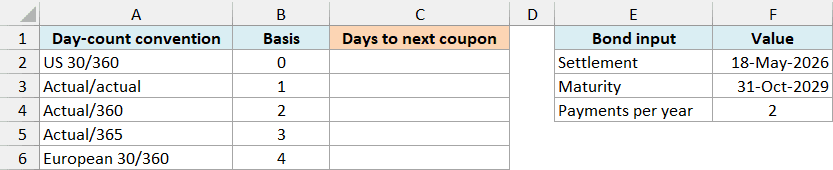
On the Day Count Basis sheet, enter this formula in C2 and copy it down through C6:
=COUPDAYSNC($F$2,$F$3,$F$4,B2)
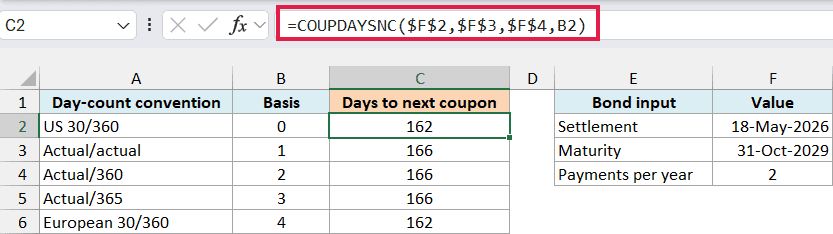
The first three arguments stay fixed, while B2 supplies the basis code for each row. The next coupon is October 31, 2026 in every case.
For the May 18 settlement, the two 30/360 conventions return 162, while the three actual-day conventions return 166.
The 30/360 methods count using standardized 30-day months, with adjustments for certain month-end dates. That’s why their count can differ from the actual number of days between the dates.
Actual/actual, Actual/360, and Actual/365 use different year lengths when calculating a fraction of a year. Here, COUPDAYSNC returns only the days remaining, so all three give the same actual-day count.
The US and European 30/360 methods agree for these dates, but their month-end rules differ. Don’t assume that basis 0 and basis 4 are interchangeable for every bond.
Important: Leaving out basis uses US 30/360, which gives 162 here. If you need actual calendar days, specify basis 1; for a bond calculation, use the basis required by that bond.
Enter a basis code from 0 through 4. An out-of-range whole number, such as 5, returns #NUM!.
Example 4: Settle on a Coupon Date
The count changes sharply when settlement reaches a coupon date.
Below are seven consecutive settlement dates around an October 31 coupon, and I want to see the days remaining in column B.
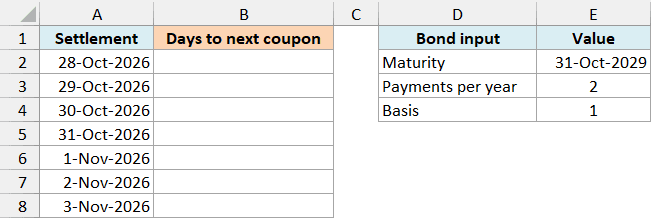
On the Coupon Date Boundary sheet, enter this formula in B2 and copy it down through B8:
=COUPDAYSNC(A2,$E$2,$E$3,$E$4)
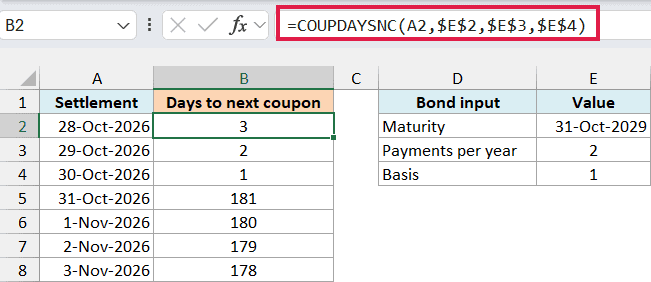
The formula returns 3, 2, and 1 for October 28, 29, and 30. All three settlement dates come before the October 31 coupon.
On October 31, the result becomes 181, rather than zero. Settlement is now on a coupon date, so Excel counts forward to the following coupon on April 30, 2027.
November 1 returns 180, and the count continues to fall as settlement moves toward that April coupon. This reset is expected behavior, not a formula error.
These are scheduled coupon dates. COUPDAYSNC doesn’t move a payment to a business day when the scheduled date falls on a weekend or holiday, so the count alone doesn’t tell you when cash will reach an account.
So these examples show how COUPDAYSNC uses the settlement date, payment schedule, and day-count basis to calculate days to the next coupon. I hope you found this tutorial helpful.
Other Excel Articles You May Also Like: