
The MDURATION function in Excel calculates a bond’s modified duration, a measure of how much its price may change when its yield changes.
It calculates that sensitivity without making you work through every future coupon payment. You supply the bond’s dates, annual coupon rate, annual yield, payment frequency, and day-count convention.
MDURATION returns one value for one set of bond inputs. Passing a range of yields directly to it does not produce a list of results, so the comparisons below use a separate formula for each row.
Follow along with the example file
MDURATION Function Examples.xlsx
MDURATION Function Syntax
Below is the syntax for the MDURATION function:
=MDURATION(settlement,maturity,coupon,yld,frequency,[basis])
Where:
- settlement is the date the buyer takes ownership of the bond. It must be earlier than the maturity date.
- maturity is the date the bond’s principal is due to be repaid.
- coupon is the bond’s annual coupon interest rate. For a 4.5% coupon, enter
4.5%or0.045. - yld is the bond’s annual yield to maturity, entered as a percentage or decimal. This is separate from its coupon rate.
- frequency is the number of coupon payments each year:
1for annual,2for semiannual, or4for quarterly payments. - [basis] is optional and sets how days are counted:
0for US 30/360,1for Actual/Actual,2for Actual/360,3for Actual/365, or4for European 30/360. If omitted, it defaults to0.
Enter the coupon and yield as annual rates even when payments are semiannual or quarterly. The frequency argument handles the payment schedule, so you don’t need to divide those rates yourself.
Excel truncates fractional parts of settlement, maturity, frequency, and basis. Use whole-number frequency and basis codes to make the intended settings clear.
MDURATION works in Excel for Microsoft 365, Excel 2024, 2021, 2019, and 2016, including supported Mac versions.
When to Use the MDURATION Function
Use MDURATION when you need to:
- Calculate interest-rate sensitivity for a bond with regular, fixed coupon payments.
- Compare the same bond at different yields or day-count conventions.
- Estimate its percentage price change for a small change in yield.
Let’s work through these with a few examples.
Example 1: Calculate a Bond’s Modified Duration
Let’s start with one bond.
Below are the details of a bond paying a 4.5% annual coupon in two payments each year, and I want to calculate its modified duration in cell B8.
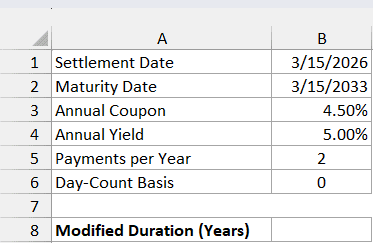
Enter this formula in cell B8:
=MDURATION(B1,B2,B3,B4,B5,B6)
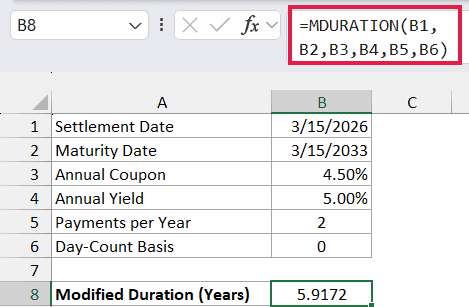
The formula returns 5.9172, displayed to four decimal places. It uses the March 15, 2026 settlement date, March 15, 2033 maturity date, 4.5% coupon, 5% yield, two payments per year, and US 30/360 basis.
Modified duration is expressed in years, but it isn’t the time left until maturity. Here, it means a small increase in yield of 0.10 percentage point would produce an estimated price decrease of about 0.59%.
We’ll calculate that percentage in Example 4. A decrease in yield gives an estimated increase in price instead.
Use real Excel dates in B1 and B2, rather than date-looking text. The DATE function can help create dates without relying on how Excel interprets a typed date string.
If MDURATION returns #VALUE!, check that the dates are valid Excel dates. If it returns #NUM!, check that settlement comes before maturity, neither rate is negative, frequency is 1, 2, or 4, and basis is between 0 and 4.
Example 2: Compare Different Bond Yields
Now let’s keep the bond’s dates and coupon fixed and change its yield.
Below are six annual yields for the same bond, and I want to calculate the modified duration for each in column B.
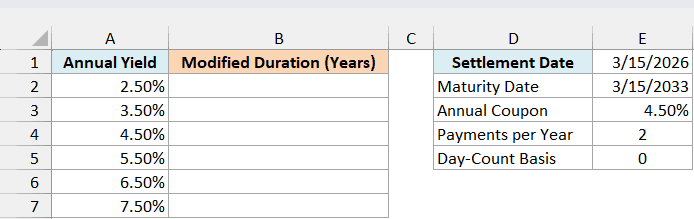
Enter this formula in cell B2 and copy it down to B7:
=MDURATION($E$1,$E$2,$E$3,A2,$E$4,$E$5)
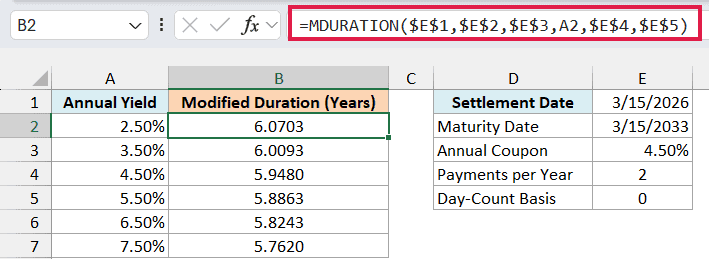
In this formula, A2 supplies the yield for the first row. The absolute cell references keep the dates, coupon, payment frequency, and basis fixed as you copy the formula down.
At a 2.5% yield, modified duration is 6.0703. At a 7.5% yield, it is 5.7620, so this bond becomes less sensitive to a small yield change as its starting yield increases.
Important: Keep the yield argument as one cell per formula here. Replacing A2 with A2:A7 directly in MDURATION returns #VALUE! rather than spilling six results.
The coupon rate stays at 4.5% throughout this comparison. Changing the market yield doesn’t change the bond’s fixed coupon payments.
Example 3: Compare Day-Count Conventions
The basis argument can also change the result because it changes how Excel measures time between dates.
Below are the five day-count conventions for a bond settled between coupon dates, and I want to compare their modified durations in column C.
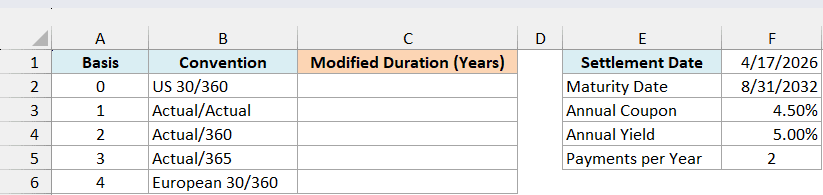
Enter this formula in cell C2 and copy it down to C6:
=MDURATION($F$1,$F$2,$F$3,$F$4,$F$5,A2)
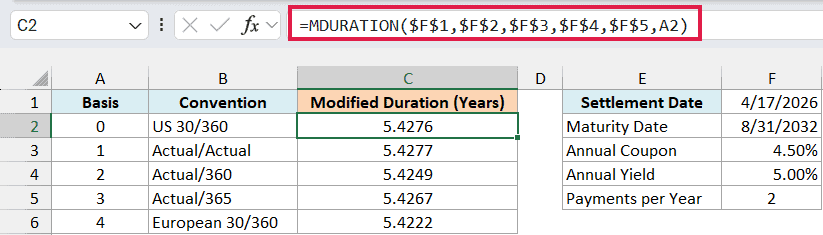
Here, the first five arguments stay fixed, and A2 supplies the basis code. The settlement date is April 17, 2026, and the maturity date is August 31, 2032.
US 30/360 returns 5.4276, while Actual/Actual returns 5.4277. The other conventions produce slightly different results too, which is why the file displays four decimal places.
The 30/360 conventions use 30-day months and a 360-day year, with different rules for some month-end dates. The Actual conventions use actual calendar days, with the year treatment determined by the selected basis.
Use the convention specified for the bond you’re analyzing. Omitting basis silently uses US 30/360, so leaving it out isn’t the same as asking Excel to choose the right convention.
Example 4: Estimate a Bond’s Price Change
Once you have modified duration, you can use it to estimate the effect of a small yield change.
Below are six possible yield changes for the first bond, and I want to estimate the corresponding percentage price changes in column B.
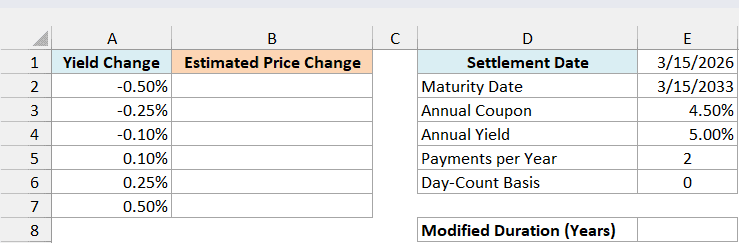
First, calculate modified duration in cell E8:
=MDURATION(E1,E2,E3,E4,E5,E6)
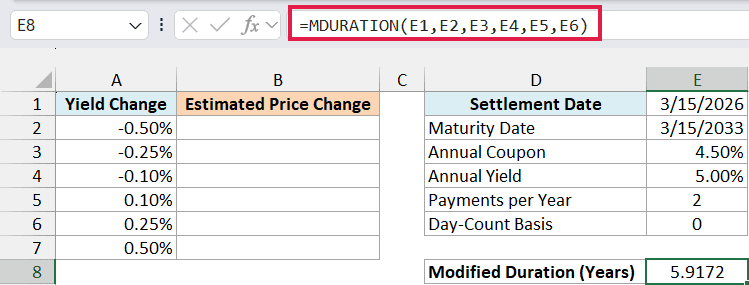
This returns the same 5.9172 as Example 1. The estimate is the negative of modified duration multiplied by the change in yield, expressed as a decimal.
Enter this formula in cell B2:
=-$E$8*A2:A7
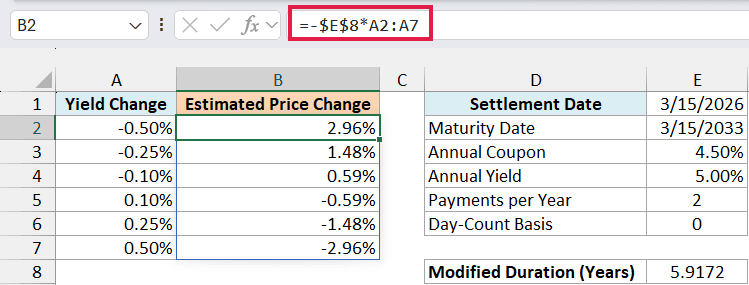
In Excel for Microsoft 365, 2024, or 2021, the multiplication spills all six results into B2:B7. Format those results as percentages with two decimal places, as shown above.
The 0.10% yield change represents a rise from 5.00% to 5.10%, which is 0.10 percentage point. It is stored as 0.001, and multiplying it by negative modified duration gives an estimated price change of -0.59%.
A -0.10% yield change represents a fall from 5.00% to 4.90%. The estimated price change is +0.59% because the negative sign reverses the direction.
Important: This is an estimate for small yield changes. Bond prices don’t move in a straight line as yields change, so larger changes need a fuller calculation that accounts for that curvature.
If you’re using Excel 2019 or earlier, enter the following formula in cell B2 and copy it down to B7:
=-$E$8*A2
Keep the yield-change inputs as percentages in either version. Entering 0.10 instead of 0.10% would mean a change of 10 percentage points and make the estimate 100 times larger.
MDURATION gives you the sensitivity measure directly, and you can reuse it across a set of small yield changes. If you need the cash-flow-weighted time measure instead, the DURATION function calculates Macaulay duration.
Other Excel Articles You May Also Like: