
The COUPDAYS function in Excel returns the number of days in the bond interest-payment period that contains the settlement date. This period is called a coupon period, and settlement is when the buyer takes ownership of the bond.
The result depends on the bond’s payment frequency and its day-count convention. A six-month period can return 180, 181, or even 182.5 days, depending on how those days are counted.
Below, I’ll show you four examples, from finding one bond’s coupon period to comparing payment frequencies, day-count conventions, and leap years.
Follow along with the example file
COUPDAYS Function Examples.xlsx
COUPDAYS Function Syntax
Here is the syntax of the COUPDAYS function:
=COUPDAYS(settlement,maturity,frequency,[basis])
- settlement is the date the bond purchase settles. Use a cell containing a real Excel date.
- maturity is the date the bond reaches the end of its term. Excel uses this date and the payment frequency to work backward through the coupon schedule.
- frequency is the number of interest payments each year. Use 1 for annual payments, 2 for semiannual payments, or 4 for quarterly payments.
- basis is optional and tells Excel which day-count convention to use. The available codes are shown below.
| Basis | Day-Count Convention |
|---|---|
| 0 or omitted | US (NASD) 30/360 |
| 1 | Actual/actual |
| 2 | Actual/360 |
| 3 | Actual/365 |
| 4 | European 30/360 |
If you leave out basis, Excel uses 0. Choose the basis specified in the bond’s terms, because changing it can change the answer even when the dates stay the same.
COUPDAYS is available in Excel for Microsoft 365, Excel 2024, 2021, 2019, and 2016, including supported Mac versions. The spilling examples below need dynamic-array support; they were verified in Microsoft 365 for Windows.
When to Use the COUPDAYS Function
Use this function when you need to:
- Find the length of the coupon period containing a bond’s settlement date.
- Calculate period lengths for bonds with different payment frequencies.
- Check how the day-count basis affects a coupon-period calculation.
- Account for a leap day within an actual/actual coupon period.
Let’s start with one bond, then move to lists and comparisons.
Example 1: Find a Bond’s Coupon Period Length
Let’s start with a simple semiannual bond.
Below are the terms of a bond settling on February 10, 2027, and I want its coupon-period length in cell B5 on the Basic Period sheet.
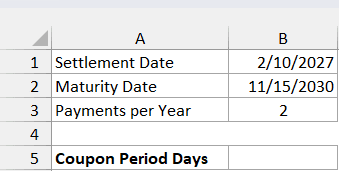
Enter this formula in cell B5:
=COUPDAYS(B1,B2,B3)
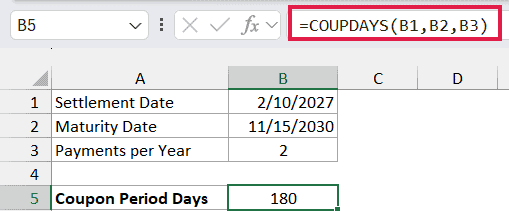
The formula returns 180. It reads the settlement date from B1, the maturity date from B2, and the payment frequency of 2 from B3.
There is no fourth argument, so the calculation uses the default US 30/360 basis. That convention gives a semiannual period 360 divided by 2, or 180 days.
The result covers the entire coupon period containing February 10. It isn’t the number of days from February 10 to maturity or the number remaining until the next payment.
This example uses one result cell because we’re checking one bond. The next example calculates several bonds with one formula.
Important: The settlement date must be earlier than maturity. If the two dates are equal or settlement is later, COUPDAYS returns #NUM!.
If an imported date is text that Excel can’t recognize, COUPDAYS can return #VALUE!. Use real date cells, or build a date with the DATE function, rather than relying on an ambiguous text date such as “02/10/2027”.
Example 2: Compare Different Payment Frequencies
Now let’s calculate period lengths for a small bond list.
Below are six fictional public-project bonds on the Payment Frequency sheet, and I want each bond’s coupon-period length in column E.
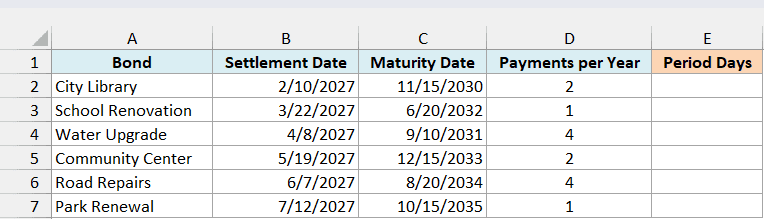
Enter this formula in cell E2:
=COUPDAYS(+B2:B7,+C2:C7,+D2:D7)
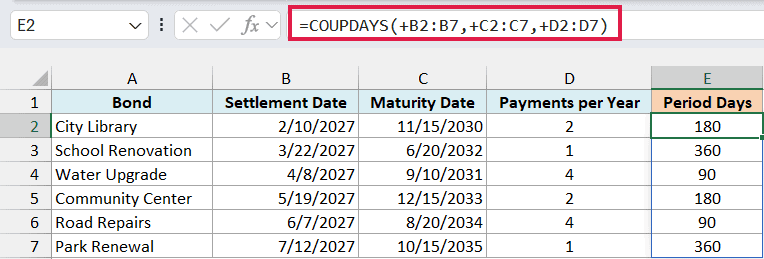
The formula returns 180, 360, 90, 180, 90, and 360, spilling the six results into E2:E7. Each row uses its own settlement date, maturity date, and payment frequency.
With the default basis, annual payments give a 360-day period, semiannual payments give 180 days, and quarterly payments give 90 days. The dates still need to be valid even though these period lengths are fixed by the convention.
The + signs before the ranges matter here. COUPDAYS can reject a direct multi-cell reference with #VALUE!; the unary plus converts that reference into an array of values that the function can process.
This doesn’t add 1 or change the dates. It lets one formula use all six rows of real dates and numeric frequencies.
If you’re using Excel 2019 or earlier, enter the following formula in E2 and copy it down through E7:
=COUPDAYS(B2,C2,D2)
For the spilling formula, leave E3:E7 empty before entering it. If another value blocks that area, Excel shows #SPILL!; clear the blocking cells so the results can appear.
Use only 1, 2, or 4 for the payment frequency. A value such as 12 returns #NUM!, so COUPDAYS isn’t a monthly-payment function.
COUPDAYS drops fractional parts of its numeric arguments rather than rounding them. For example, a frequency of 2.9 is treated as 2, so check that imported frequency codes are whole numbers.
Example 3: Compare the Five Day-Count Bases
Let’s keep the bond terms fixed and change only the basis.
Below are the five day-count conventions on the Day Count Basis sheet, and I want their coupon-period lengths in column C for the bond shown beside them.
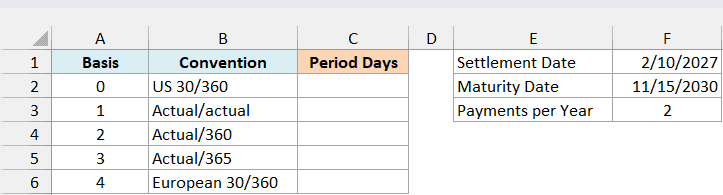
Enter this formula in cell C2:
=COUPDAYS(F1,F2,F3,+A2:A6)
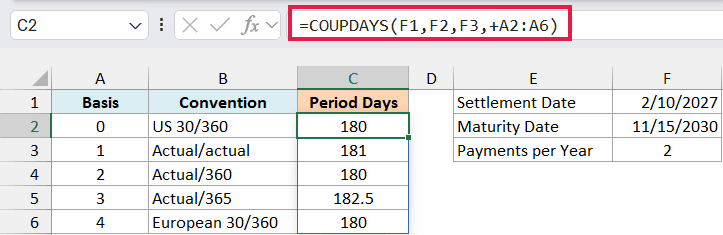
The formula uses the same settlement, maturity, and frequency from F1:F3 for every calculation. Only the basis changes, using the five codes in A2:A6.
The results are 180, 181, 180, 182.5, and 180. For COUPDAYS, bases 0, 2, and 4 use 360 divided by the payment frequency, while basis 3 uses 365 divided by the frequency.
Basis 1 counts the actual calendar days between the surrounding coupon dates. For this bond, February 10, 2027 falls between November 15, 2026 and May 15, 2027, a period of 181 days.
Notice that basis 2 is called Actual/360 but still returns 180 here. COUPDAYS supplies the convention’s full coupon-period denominator; the word “Actual” doesn’t mean this particular function returns the calendar distance for every basis.
The 182.5 result for basis 3 is valid: 365 divided by 2 is 182.5. Keep the result cells in General format, or use a number format that shows decimals, so 182.5 doesn’t appear rounded to 183.
Important: Only basis 1 gives the actual calendar length of this coupon period. Use the bond’s stated basis for financial calculations; substituting another basis can give the wrong result.
An unsupported basis such as 5 returns #NUM!. A fractional basis is truncated, so 1.9 is treated as 1 rather than rejected.
If you’re using Excel 2019 or earlier, enter the following formula in C2 and copy it down through C6. The dollar signs keep the three bond inputs fixed:
=COUPDAYS($F$1,$F$2,$F$3,A2)
Example 4: Check a Leap-Year Coupon Period
Actual/actual periods can change length when they include February 29.
Below are six hypothetical settlement dates for the same bond on the Leap Year Periods sheet, and I want the actual coupon-period lengths in column B.
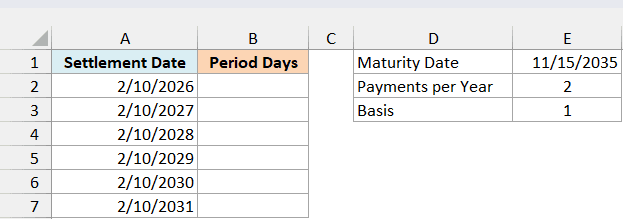
Enter this formula in cell B2:
=COUPDAYS(+A2:A7,E1,E2,E3)
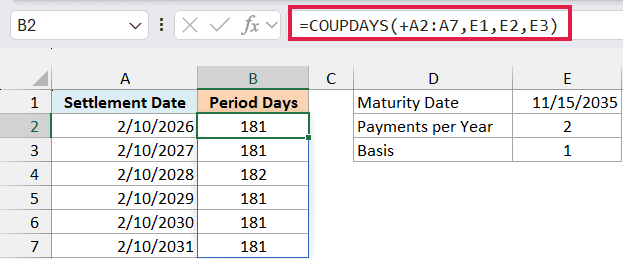
The formula returns 181, 181, 182, 181, 181, and 181. It uses the settlement dates in A2:A7 with the fixed maturity date, frequency, and basis from E1:E3.
The November 15 maturity date and frequency of 2 establish payments on May 15 and November 15. Each February settlement therefore falls in a period that runs from the previous November 15 to the current May 15.
For February 10, 2028, that period runs from November 15, 2027 to May 15, 2028. It includes February 29, so the result is 182 days instead of 181.
The settlement date selects the coupon period. Moving settlement within that same period doesn’t shorten the full period that COUPDAYS returns.
If you’re using Excel 2019 or earlier, enter the following formula in B2 and copy it down through B7:
=COUPDAYS(A2,$E$1,$E$2,$E$3)
These examples show how COUPDAYS combines the coupon schedule with the chosen day-count basis. If you need only part of the period, the COUPDAYBS function counts from its beginning to settlement, while the COUPDAYSNC function counts from settlement to the next coupon.
Other Excel Articles You May Also Like: