

One of my teammates has the responsibility of creating a leave tracker template in Excel for the entire team. This tracker template is then used to track vacations/holidays and planned leaves of the team members.
Till now, she used a simple Gantt chart in Excel but wanted something better with more functionalities.
So, I created this Excel Leave Tracker Template to make leaves management easy and track monthly and annual leaves by her team members.
You can also use this as a vacation tracker template or student attendance tracker if you want.
Excel Leave Tracker Template
This Excel Leave Tracker template can be used to record and monitor employee leaves for a year (of a financial year where you can choose the starting month of the year).
You can track 10 different leave codes for an employee – vacation leaves, sick leaves, maternity/paternity leaves, casual leave tracking, leave in lieu of overtime, and half days, etc.
It also provides a monthly and yearly total of different types of leaves that can be helpful in project planning and leave management.
It uses a bit of conditional formatting, a few DATE functions, array formulas, and a simple VBA code.
Download the Excel Leave Tracker Template (tracking for 20 employees/people)

Looking for the Google Sheets version of this Leave Tracker Template? Click here!
How this Excel Leave Tracker Template Works?
- Use the triangle icons next to the month name to move to the next/previous month (the template updates itself to show the dates for the selected month). There is a short VBA code that runs in the background whenever you change the month. It shows you the selected month only and hides all the other months.
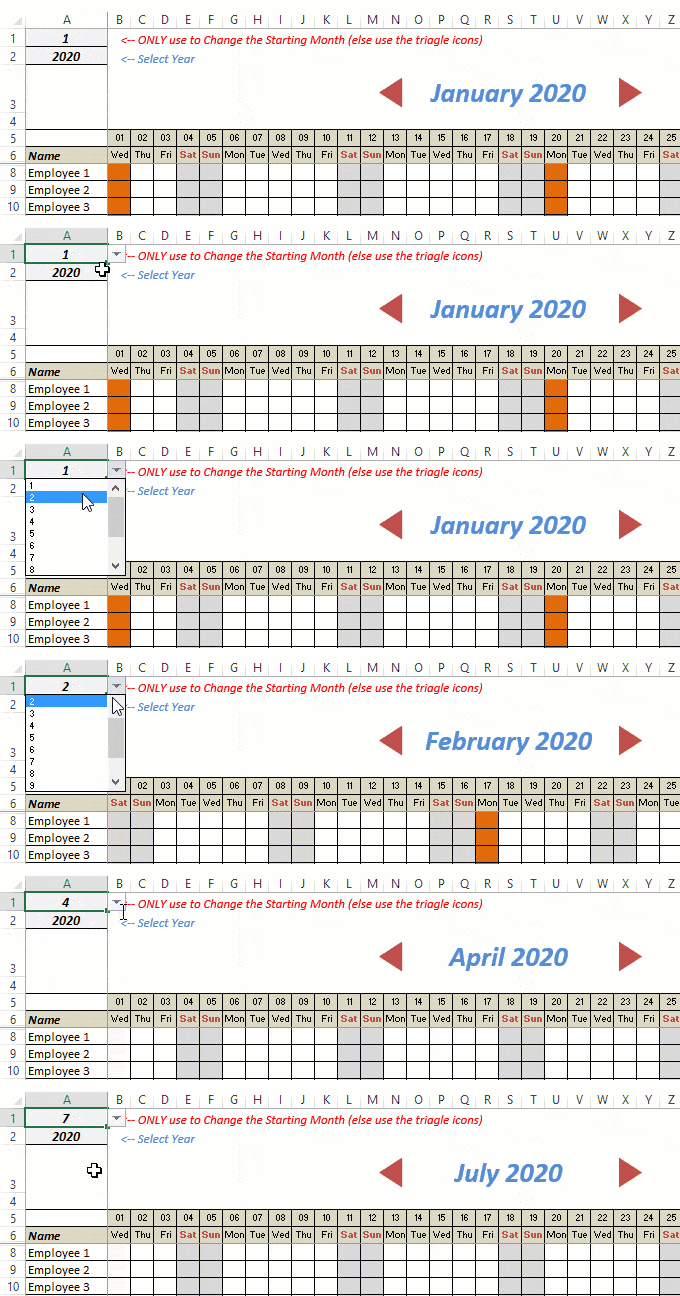
- This Excel template can be used to track leaves for over a year. You can select a start month and can track leaves for a year. For example, if you follow the April-March cycle, select April 2023 as the starting month.
- Note: The value in cell A1 is to change the time period of the leave tracker ONLY. DO NOT use Cell A1 to move to the next month while recording leaves. Use the triangle icons next to the month names to go to the next/previous month and mark leaves.

- You can specify the working days and non-working days (Weekends). At the right of the leave tracker, there is functionality to specify the working days by selecting Yes from the drop-down. If you select No, that day is marked as a non-working day in the leave tracker.
- As soon as you specify the non-working days, those weekdays get highlighted in gray color in the leave tracker.

- You can update the holiday list in the worksheet named “Holiday List”. It will automatically be reflected in the tracker by highlighting those days in Orange color.
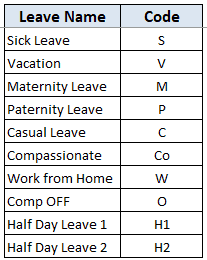
- To enter the leave record for employees, use the relevant codes based on the leave type (you can customize these leave codes). For example, in the case of sick leave, use S, in the case of Vacation, use V, as so on.
- There are two codes reserved for half-day leaves. you can enter H1 or H2 for a half-day leave.

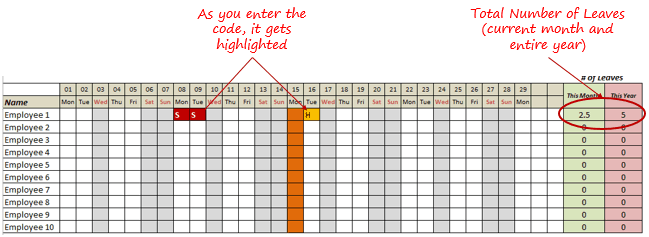
- As soon as you enter the leave code for any employee, it gets highlighted in red (in the case of half-day, it gets highlighted in yellow). If that day is a weekend or holiday, the color would not change.
- Column NJ (highlighted in green in the pic below) has the number of leaves of that employee in that month. It counts the leaves on working days only (those on weekends and/or holidays are not counted). Half-day leaves are counted as 0.5.
- UPDATED: Column NK (highlighted in light red in the pic below) has the number of annual leaves taken by an employee. It counts the leaves on working days only (those on weekends and/or holidays are not counted). Half-day leaves are counted as 0.5.
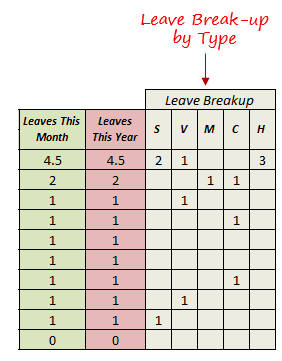
- Columns NL to NU gives the leave break-up by leave code (for the entire year). This could be helpful to keep a track of the type of leave that has been availed. Note that while Half Leaves are counted as .5 leaves in the total count, in the leave break-up, it is counted as whole numbers. For example, 2 half leaves would lead to 1 leave count, but you’ll see two half leaves in the leave breakup.
I have created this leave/attendance tracker template for 20 employees. If you want to add more, just copy-paste the formatting and formulas for additional rows.
Also, since there is a VBA code involved, make sure you always save it with .xls or .xlsm extension.
Download the Leave Tracker Template
Note: To update this template for any year, simply change the year value in cell A2. For example, to make it for 2017, just change the value in A2 to 2017. Also, you need to update the holiday list for the specified year.
The download file is completely unlocked so you can customize it to your needs.
Here is another version of the template that can track leaves for 50 employees.
Want to learn how to create awesome templates and dashboards? Check out the Excel Dashboard Course
FAQs on using this Leave Tracker Template
Since I created this vacation/leave tracker, I have been inundated with emails and comments. What you see now is a refined version that has been possible due to all the feedback that I have got.
Based on the questions I get repeatedly, I have created this FAQ section so that you can get an answer faster (instead of waiting for me to respond).
Here are the most common questions I get about the Leave tracker template:

Q: I tried downloading the file but it downloaded as a zip. How do I use it?
A: I have fixed this issue, and now you should be able to download the Excel file directly.

Q: When I change the month, the existing leaves are reflected in the changed month as well.
A: This happens when you use cell A1 to change the month. You need to use the arrow icons to change months. Cell A1 is to be used only to set the starting month of the calendar. For example, if you want the calendar to start from April, make cell A1 value 4. Now to move to March, use the triangle icons.

Q: I need to track multiple years of leaves. Do I need to create a new worksheet for each year (financial year)?
A: Yes! This leave tracker can only track leaves for a 12 month period. You need to create a copy for each year.

Q: Can I use my own leave codes?
A: Yes! You can change the leave code in cells NX8:NX17. You also need to specify the same code in cells NL5:NU5. For example, if you change the Work from Home leave code to X, you also need to change it in NR5.
I hope you find this leave/vacation tracker helpful.
Are there any other areas where you think an Excel template could be helpful? I am hungry for ideas and you are my gold mine. Do share your thoughts in the comments section 🙂
Related Excel Project Management Tutorials and Templates:

Hello, this document is amazing. However, I would like to add a column between the employees name and the first day of the month and I can’t seem to find how to do that without impacting everything. Any thoughts?
This is amazing! Thank you.
How do you do the triangle things?
i wanted to know how i can remove employee 3 from February month. i want this employee only in January. From Feb onwards i dont want this employee in the leave track as he is resigned.
hi, since we have different week offs for employees how can i mark week ends for each employee seperately?
Hi Instead of H2 which is Half Day Leave 2, I want to create a new code altogether as Unplanned Leave but still the value shows as 0.5 whereas it should get changed to 1 ideally. Could someone please tell me how to alter this change?
This leave tracker template is the best I’ve seen. Thank you.
Just wondering if it’s difficult to add a section where you can enter the number of leave days that are allowed and so the days left over can be tracked.
Thank you again and looking forward to a possible solution.
Hi Marc,
It’s not difficult. I just inserted some columns at the end and added in the formulas.
Hi! Thanks for the amazing tool! Any idea how I can print a document showing all months at the same time?
Hi! Thanks for the amazing tool! Any idea how I can print a document showing all monts at the same time?
Hello.
This is a great tool to track the annual leave for the workers in the company. I am a big fan of the different reason for leave. However, there is something that I think will be useful and maybe someone can help me with. For example: If we have a worker who works in some of the holidays, later need to be compensated with an extra day. How we can track the extra days for the workers who work on holidays?
Thanks for your help!
Hi, this is a great tool for leave tracking, thank you!! Is it possible to change the colour of each leave type? For example all codes highlights the cell in red, is it possible to have different colours for each different code?
Hi, this is a very nice leave tracker, but i have employees from multiple locations and their holidays are different; is there any way we can set that up?
Hi This Leave tracker is fantastic. Thanks for sharing. However my HR is running on monthly cycle of 16th – 15th every month. First month 16Dec18-15Jan19, Second month 16Jan19-15Feb19.. and so on. Can the dashboard and vba formula be adjusted to achieve this?
Hi,
This is an excellent leave tracker.
I have few questions:
1- We do not half days leaves so how can i remove it from formula and instead use my own codes for full day. I tried removing 0.5 with 1 in formula but it didn’t work.
2- How can week ends be included in tracker calculation if someone is assigned to work on weekends?
Thanks
This Leave Tracker Template works very well. The one addition I would like is ability to assign points to each leave type instead of just counting 1 occurrence or the half day. Attempted change but could not get to work. Any change to yearly or monthly column generates InValid error.
How I can upload this to work in Google sheets?
This tracker is really cool , just what I need. I have one query though, if I want to change the leave codes and delete few of them , the formula for the color coding does not work can you please help me with that
Thank you very much for this. It’s simple, works on a complex level and is EXACTLY what I need. Thank you for making it available.
hi
i am not able to change the month to feb in leave tracker.
i get a message that macros disabled
can u help
Hi Ritu,
You need to change the spreadsheet type to a “macro enabled” Excel Workbook.
This is tracker is great!!! i have a question though. we have limited leaves at work and no overtime pay but we have “offsets” which are excess work hours that we can use in place of leaves at certain cases. how can I count cumulative offsets and offsets used apart from the leaves in one spreadsheet?
fantastic work
i really thank you for this
but i have question, how can I print all the months in on paper?
i tried and all i can print is one month, the rest months does not appear to be able to be printed,
I am trying to add a few codes in the table and cannot figure out how to get them to calculate correctly in the leaves this month and leaves this year columns. Can you assist?
I know this was created a few years ago but I am hoping you can still help. The spreadsheet is perfect for me except the holidays listed are not part of our holidays. I was able to make the change to the list but it doesn’t include the column in the calculations. Can you help me? For example, my employees work on MLK and President’s day.
Just delete those days your employees work off the holiday list. For holidays you have but are not on the list, simply type in the name and the date. They will populate.
Great work. I am loving it. Please if i want another column (between NJ and NK) that displays the amount of half days taken per month so as i go to the next month it resets; so that at a glance i can know how many half days an employee took per month…id be really grateful.
This spreadsheet is excellent, exactly what I was looking for to track leave. Thank you 🙂 Is there a way to change the colour coding of vacation leave so you can see the difference immediately between sick and vacation
how do i capture the remaining number of leave days the employees has in a year
Hello! Thank you so much for sharing this resource, it is amazing. Is there anyway you could please guide me through changing the dates? Our pay period isn’t based on the month, it’s from the 20th to the 20th (for example, 1/20/19 – 2/20/19 counts as one pay period). Any help you could provide would be greatly appreciated!
This is superb !!
This excel is very nice. But how can I add minutes of late in the tracker so that it will add the leaves and lates. Thank you
Do I have a control on this tracker once downloaded? im afraid it will be corrupted since this is my tracker for my company’s leave/s
Is there a way to assign a different color to each leave code?
Please check the week number – its not working “#N/A” this is what I see in the box….
I have both of your versions – 10 and 20 employees. . . .
Thanks so much for your amazing work.
Kind Regards,
Newman
To the Hayley Bama and Bircbox. Ex editor from More magazine Abby Perlman recently got involved in dirty coraption business with crazy CBS anchor Otis Livingston to steal money from Bircbox employees bank accounts. Never deal with Abby Perlman and Otis Livingston they belong in prison!!!!!!!!!!!!!
How do I create a column after the employee name . I need 4 columns. but when I add the date changes.
Is there any way to have multiple sheets of these work on one file? When attempting to use it for multiple departments it gives an error “Runtime error “1004” Method ‘Range’ of object’_Worksheet’failed
Good day! I have loved using your leave tracker this past year for 2018, I modified it for my vacation schedule in Canada 😉
Will you be providing a 2019 leave tracking soon?
helo this leave tracker is very helpful, just having a problem on changing the working day example in this program SAT and SUN is considered day off but in my case our day off is Friday how can I edit the codes. Please kindly help me because I am not really good in these. Thank you!
i love the template, but would you be able to share how did you create the top portion where you click the arrows for the months to change, as i would love to use that for some other of my sheets. Thanks
Hi. Can you protect the Leave Tracker worksheet so the cells cannot be manipulated except the scroll bar – moving month to month, brining up the data for each month?
This is a great sheet !!!! Thanks so much.
The only issue I am having that if I put a password on the sheet so users are only able to change the month and edit the cells, the arrows gives me an error when going through the months
Hi,
This is awesome tool! We have employees with different work week. I would like to add all the names in the same spreadsheet rather than copying the same workbook for different work week. Is this possible? Looking forward to your reply. Thanks.
Hi,
Thanks for the tracker. I would like to customize the tracker to run with our financial year from July to June. could you kindly assist with the codes for that. in addition, i’d like the leave to only count vacation days and half days.
how do i change the code to that?
Regards.
I have changed some of the info on the holiday calendar…adding some more lines and they did not change to orange on the spreadsheet indicating they are statutory holidays. How do I correct that?
Hello there! This spreadsheet is awesome! However, the only problem that I see relates to the counting of holidays.
Per the US Department of Labor’s Employer’s Guide to The Family and Medical Leave Act (WH-1421): Calculating FMLA Leave…
Time that an employee is not scheduled to report for work may not be counted as FMLA leave. Only the amount of leave actually taken may be counted against the employee’s leave entitlement.
When a holiday falls during a week in which an employee is taking the full week of FMLA leave, the entire week is counted as FMLA leave. However, when a holiday falls during a week when an employee is taking
less than the full week of FMLA leave, the holiday is not counted as FMLA leave, unless the employee was scheduled and expected to work on the holiday and used FMLA leave for that day.
An employee does not accrue FMLA leave at any particular hourly rate.
Would you be able to address how to correct the leave count?
Hello, how to add holiday and day off in the total?
I am with Sharon Williams & Laura. I really need to be able to change the color of the codes so they are more distinguishable for my upper management team. Please advise ASAP
Can I change colours of a code. For example, I may want casual to be a different colour from vacation
This is exactly what I’ve been looking for. However, I changed the list of holidays to reflect the holidays that we offer. How do I remove the orange highlight on the column for holiday that is a workday for my employees and not a day off?
Hi, this is very useful in my end.
-I want to know what is the formula if I am going to breakdown the Leaves per month.
Thanks,
Alma
Hi this is great and super useful. I want to ask if I can do the following:
– Assign certain Holidays to employees (example certain holidays only apply to certain employees located off-shore etc)
– How can I add a “Late” or “Tardy” counter?
– I want to change Work from Home as a valid working day therefore will not count as a leave
Hello, this is exactly I need, just it would be nice to have the month, days and some other words translated into slovenian, how xould I do this?