

One of my teammates has the responsibility of creating a leave tracker template in Excel for the entire team. This tracker template is then used to track vacations/holidays and planned leaves of the team members.
Till now, she used a simple Gantt chart in Excel but wanted something better with more functionalities.
So, I created this Excel Leave Tracker Template to make leaves management easy and track monthly and annual leaves by her team members.
You can also use this as a vacation tracker template or student attendance tracker if you want.
Excel Leave Tracker Template
This Excel Leave Tracker template can be used to record and monitor employee leaves for a year (of a financial year where you can choose the starting month of the year).
You can track 10 different leave codes for an employee – vacation leaves, sick leaves, maternity/paternity leaves, casual leave tracking, leave in lieu of overtime, and half days, etc.
It also provides a monthly and yearly total of different types of leaves that can be helpful in project planning and leave management.
It uses a bit of conditional formatting, a few DATE functions, array formulas, and a simple VBA code.
Download the Excel Leave Tracker Template (tracking for 20 employees/people)

Looking for the Google Sheets version of this Leave Tracker Template? Click here!
How this Excel Leave Tracker Template Works?
- Use the triangle icons next to the month name to move to the next/previous month (the template updates itself to show the dates for the selected month). There is a short VBA code that runs in the background whenever you change the month. It shows you the selected month only and hides all the other months.
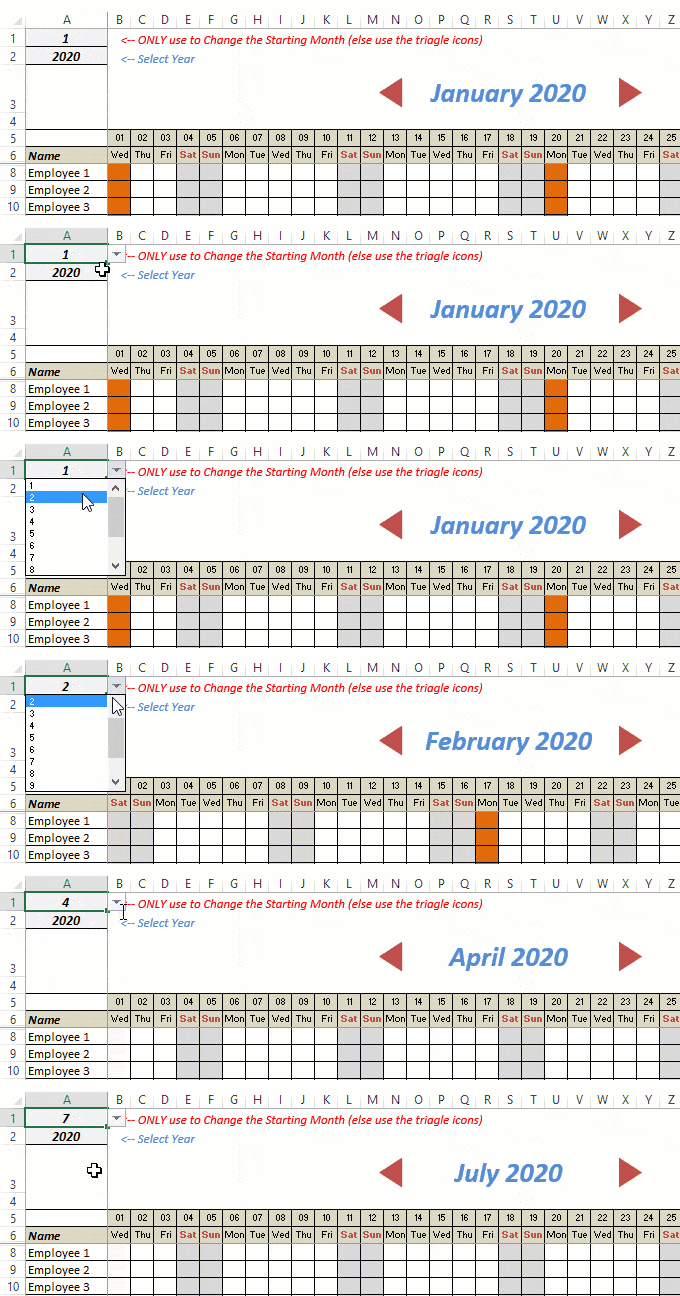
- This Excel template can be used to track leaves for over a year. You can select a start month and can track leaves for a year. For example, if you follow the April-March cycle, select April 2023 as the starting month.
- Note: The value in cell A1 is to change the time period of the leave tracker ONLY. DO NOT use Cell A1 to move to the next month while recording leaves. Use the triangle icons next to the month names to go to the next/previous month and mark leaves.

- You can specify the working days and non-working days (Weekends). At the right of the leave tracker, there is functionality to specify the working days by selecting Yes from the drop-down. If you select No, that day is marked as a non-working day in the leave tracker.
- As soon as you specify the non-working days, those weekdays get highlighted in gray color in the leave tracker.

- You can update the holiday list in the worksheet named “Holiday List”. It will automatically be reflected in the tracker by highlighting those days in Orange color.
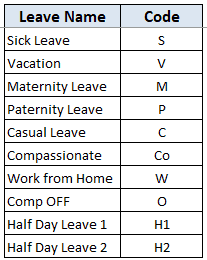
- To enter the leave record for employees, use the relevant codes based on the leave type (you can customize these leave codes). For example, in the case of sick leave, use S, in the case of Vacation, use V, as so on.
- There are two codes reserved for half-day leaves. you can enter H1 or H2 for a half-day leave.

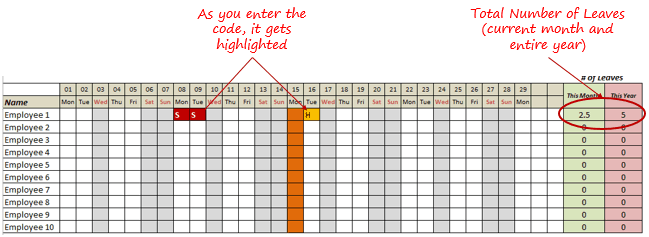
- As soon as you enter the leave code for any employee, it gets highlighted in red (in the case of half-day, it gets highlighted in yellow). If that day is a weekend or holiday, the color would not change.
- Column NJ (highlighted in green in the pic below) has the number of leaves of that employee in that month. It counts the leaves on working days only (those on weekends and/or holidays are not counted). Half-day leaves are counted as 0.5.
- UPDATED: Column NK (highlighted in light red in the pic below) has the number of annual leaves taken by an employee. It counts the leaves on working days only (those on weekends and/or holidays are not counted). Half-day leaves are counted as 0.5.
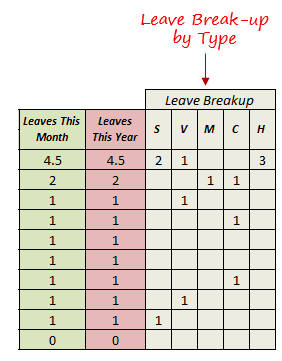
- Columns NL to NU gives the leave break-up by leave code (for the entire year). This could be helpful to keep a track of the type of leave that has been availed. Note that while Half Leaves are counted as .5 leaves in the total count, in the leave break-up, it is counted as whole numbers. For example, 2 half leaves would lead to 1 leave count, but you’ll see two half leaves in the leave breakup.
I have created this leave/attendance tracker template for 20 employees. If you want to add more, just copy-paste the formatting and formulas for additional rows.
Also, since there is a VBA code involved, make sure you always save it with .xls or .xlsm extension.
Download the Leave Tracker Template
Note: To update this template for any year, simply change the year value in cell A2. For example, to make it for 2017, just change the value in A2 to 2017. Also, you need to update the holiday list for the specified year.
The download file is completely unlocked so you can customize it to your needs.
Here is another version of the template that can track leaves for 50 employees.
Want to learn how to create awesome templates and dashboards? Check out the Excel Dashboard Course
FAQs on using this Leave Tracker Template
Since I created this vacation/leave tracker, I have been inundated with emails and comments. What you see now is a refined version that has been possible due to all the feedback that I have got.
Based on the questions I get repeatedly, I have created this FAQ section so that you can get an answer faster (instead of waiting for me to respond).
Here are the most common questions I get about the Leave tracker template:

Q: I tried downloading the file but it downloaded as a zip. How do I use it?
A: I have fixed this issue, and now you should be able to download the Excel file directly.

Q: When I change the month, the existing leaves are reflected in the changed month as well.
A: This happens when you use cell A1 to change the month. You need to use the arrow icons to change months. Cell A1 is to be used only to set the starting month of the calendar. For example, if you want the calendar to start from April, make cell A1 value 4. Now to move to March, use the triangle icons.

Q: I need to track multiple years of leaves. Do I need to create a new worksheet for each year (financial year)?
A: Yes! This leave tracker can only track leaves for a 12 month period. You need to create a copy for each year.

Q: Can I use my own leave codes?
A: Yes! You can change the leave code in cells NX8:NX17. You also need to specify the same code in cells NL5:NU5. For example, if you change the Work from Home leave code to X, you also need to change it in NR5.
I hope you find this leave/vacation tracker helpful.
Are there any other areas where you think an Excel template could be helpful? I am hungry for ideas and you are my gold mine. Do share your thoughts in the comments section 🙂
Related Excel Project Management Tutorials and Templates:

how can we insert one more column for emp ID with no changes in the code
?
Thank you for sharing this tracker, I want to share this information with all our staff. How can I protect it so others have access to view only?
I want to add more type of leave, how to make it automatically counted either as 1 day or 0.5 day? I tried to copy to formulas but it does not work, and the new leave I added in is not marked as highlight as well.
Thank you.
Yes, its so helpful and make my job in tracking annual leave for each individual so much easier~ thanks!
how to set working days for specific employees,because their non working days are different.
Also what can I do if the time frame of employees allowed vacation are not the same ??
I tried to duplicate the sheet to change years but wasnt working
Hi this is a very good tool that helps managing the team capacity.
Here some input for improvement:
– Add the Indicator of team capacity (target) and a rule to automatically check the target with availability? for instant my if my expected capacity of a team is 8 people and i have a rule of only 2 planned absence in the team i would like to get an alert when the absences exceed the rule.
Hi. This template is very useful and serves a very god purpose. However, what if I don’t want to include work from home as part of leave? I want to exclude work from home from monthly as well yearly leaves. I tried to change the formulas a couple of places, but didn’t work. Appreciate your help on this.
Thank you very much for sharing this you have just saved me hours of creating my own version i am truly grateful.
I don’t need that many holiday types, just want to keep it simple for Leave and the half days. But when I delete the rest leave types the conditional formatting to show the red and yellow colours disappears. What should I do to keep the conditional formatting?
This is very helpful to tack leave for all employees, but how can I download this excel file directly.
This is very helpful. Anyway, i have one question. If employee take half day of sick leave, how could we track it? Because from your template, we cannot track half day leave by specific type of leave.
I’m looking forward to hearing from you and many thanks in advance.
It would be nice to have a spreadsheet to track hours, OT and calculate PTO. If it could be attached to this one, you would have a winner.
Thanks for the help. I needed this.
HOW TO PRINT THE FILE SHOWING EVERY EMPLOYEES LEAVE DATES?
HOW TO ADD ANOTHER TWO HALF DAY FOR LEAVE TYPES? I NEED HALF DAY VL WITH PAY, HALF DAY SL W/ PAY, HALF DAY SL W/O PAY AND HALF DAY VL W/O PAY?
Very neat tracker. Thanks so much. & My question is how can this be made so that when an employee put their details on an input bar or a different sheet, their data will automatically entered into the “group” sheet? This is in order to get data from individuals without them seeing others’ input that they can accidentally mock up.
Awesome
Hi,
Does this template has the capability to handle multiple region public holiday calendar. For e.g. employee in America have 4th July as public holiday but employee in Europe will be working on that day.
I have same issue. Is there a solution?
hi, how to input our total annual leave ?
This is a very awesome Leave Tracker, Thank you so much! Been using it for a while now. Was wondering if you can maybe make a google sheets version that has months from Feb 2019-Jan 2020. Our company renews their leave every year on the 1st of Feb.
The Leave Tracker works great! I do have one suggestion. I have employees whose working days, are not the typical Monday – Friday with Saturday and Sunday off. I have employees that have different schedules. I was hoping you will be able to modify the “Select Working Days” function towards individual employees that way the formula can calculate Leave Name and code on each employee on any day of the week.
For example: Monday – Sunday cells on calendar for each employee should have an option that designates working day a “Yes” or No” selection.
Hi,
I like the tracker and would like to use it also. However, I would like to add designation and date of joining to the tracker next to employee name. Whenever I insert a column, it shifts the date ahead. Please help.
I want alternative Saturday as a working day. How to do same changes in Leave tracker excel sheet?
Dears, how can I introduce/modify a leave reason weight so that, for instance, remote working is not counted as “leave” ?
Tried modifying the Leave formula but can’t get it to work … Thanks !
I have entered a Leave Name for Provisional Leave and I do not want it to add a day to the leave taken sum. How do I format the code I enter to have a zero effect on leave taken?
Hi, did you get it working? I’m trying to obtain the same but the formula is quite complex…
Hi no sorry I have not received feedback yet.
Your Excel sheet id quite excellent. I have few doubt to ask..!
1. i’m working in a company, my job is daily updation of leaves. So we use multiple sheets for working. now i need to work using your excel sheet, but i can’t copy the sheet to another. some problem occur during copying.
2. Using your sheet for a year. one employee is joined in January, their details remains till the end of that year. if we delete when the resigned, whole data would goes with it.
we want the month changing system, but in data should enclose with that month only, is that possible.
please give me a solution. i’m waiting for your concern.
What if we follow alternate saturdays working ?
Attan: Dara Pettinelli. Never trust Abby Perlman because she was planing to lock up Dara Pettinelli using CBS anchor Otis Livingston!
fantastic sheet… was wondering if i only wanted may and june, how do i do that?
Hi, we are trying to use this but someone has noted that if you enter ‘W’ eg Work from Home day – it is counted as holiday. This logic is wrong. How can I edit this? Thanks.
hello… liked the tool. i just want to enables multiple employees can open the sheet at a time.. it shows error “cannot be shared because has Maps or HML … ) how to fix it
hi, i was wondering if i can modify one of the codes for certain period of time less than a half day, lets say 3 hours. Thanks!
Hi this is great thank you. I’m wondering if you can tell me how to add employees as we have 70?
Insert a row and copy the formatting using the format painter tool.
can we add the annual leave in clumen
Hi,
How come I can note Enter V-(vacation) on a Holiday.
How can I do this with another code?
Looking forward to your soonest response.
Regards,
Prec
Hi I need to calculate comp days for when an employee works on a weekend due to work travel. I still want to leave the sat/sunday as non-work days but I can’t get the excel doc to calculate any annotation (OT) on the weekends. Any ideas on how I can add this into the existing document?
Thanks
Hi, the sheet is fantastic, however I would want to add time for employees for each day. When, say if I add 10:03 to employee 1, leaves increase by 1. How can I mitigate this issue?
Great spreadsheet!
How can I make it to where an absence will drop off after 90 days?
I want to keep track of total SICK days taken, but they are not to be counted against (deducted) from leaves remaining. How to make this change?
I really like the look of your template and would like to use it. Do you have a leave template that includes part-time workers whose holidays are set in hours, not days?
Hi! Your template is greatly useful. However, there is one thing you haven’t mentioned. It’s the compensation day. For example, we have a holiday from Friday to Tuesday and the next Saturday we will go to work to make up for Monday (this day isn’t a holiday but we’re off to have full holiday). How can I mark up only that Saturday as working day. I think there may be a similar table as holiday sheet.
How can I change the leave codes to reflect different colors? I wante Maternity to be different color than regular vacation.
Hi! Thank you for this. However, I am unable to use is as the triangle icons do not work. The pop reads : Macros in this document have been disabled by your enterprise administrator for security reason. How can I fix this?
Thank you for this! Saved me a ton of time. Two small comments:
1 – Macros are worrying. I inspected them before I allowed them to run. They are safe but you might want to mention them in your blurb.
2 – Give some instruction about how to create new conditional formatting rules for custom coloured leave codes.
Thanks again!
I want to add one more leave type that is short leave and assign it value 0.25, can anyone help me for that?
Hi. Thank you. This is very helpful template. Do you happen to have one for timesheets for employees?
i am not able to share the workbook
It would be great if you could actually track numbers of hours of leave taken per day for each category (so rather the “A,” It’s “A8” for a full day’s annual leave; or “A5” for five hours annual leave on a day). For instance, if someone goes to the doctor and it takes three hours, it would be great to log three hours of sick leave on the specific day.
Also, it would be great to test the number of days leave taken against the maximum allowed (for example; a maximum of 10 day’s annual leave per year; or 30 day’s sick leave per three year cycle).
This is amazing! I cannot see the triangles where you change from month to month but they are there as I can click on them and change the month – how do you make them visible?
Hello,
how can I change the colour for highlighting the noted spots??
For example, once I add s, v or h1, I Would like to have green, light green, blue and yellow instead. And I would like to have a few different colours for highlighting.
Can you please help me with this?
I just adapted the sheet for this very thing. It’s not too tough as it’s done with conditional formatting.
For example: Create a new conditional formatting rule using Classic and Formula =B8=$NX$10 applying to ‘Leave Tracker’!$B$8:$NI$27 and give it some custom colours. You will need to remove the NX line from the rule that currently turns it red. Good luck!
thank you
it is fantastic
I have 2 questions
1.how to reduce the employees number
2. in some countries the holidays are more than one day, even up to 7 days how to adjust it
Hi there, I have the same two questions – did you manage to find anything out about these? Thanks