

One of my teammates has the responsibility of creating a leave tracker template in Excel for the entire team. This tracker template is then used to track vacations/holidays and planned leaves of the team members.
Till now, she used a simple Gantt chart in Excel but wanted something better with more functionalities.
So, I created this Excel Leave Tracker Template to make leaves management easy and track monthly and annual leaves by her team members.
You can also use this as a vacation tracker template or student attendance tracker if you want.
Excel Leave Tracker Template
This Excel Leave Tracker template can be used to record and monitor employee leaves for a year (of a financial year where you can choose the starting month of the year).
You can track 10 different leave codes for an employee – vacation leaves, sick leaves, maternity/paternity leaves, casual leave tracking, leave in lieu of overtime, and half days, etc.
It also provides a monthly and yearly total of different types of leaves that can be helpful in project planning and leave management.
It uses a bit of conditional formatting, a few DATE functions, array formulas, and a simple VBA code.
Download the Excel Leave Tracker Template (tracking for 20 employees/people)

Looking for the Google Sheets version of this Leave Tracker Template? Click here!
How this Excel Leave Tracker Template Works?
- Use the triangle icons next to the month name to move to the next/previous month (the template updates itself to show the dates for the selected month). There is a short VBA code that runs in the background whenever you change the month. It shows you the selected month only and hides all the other months.
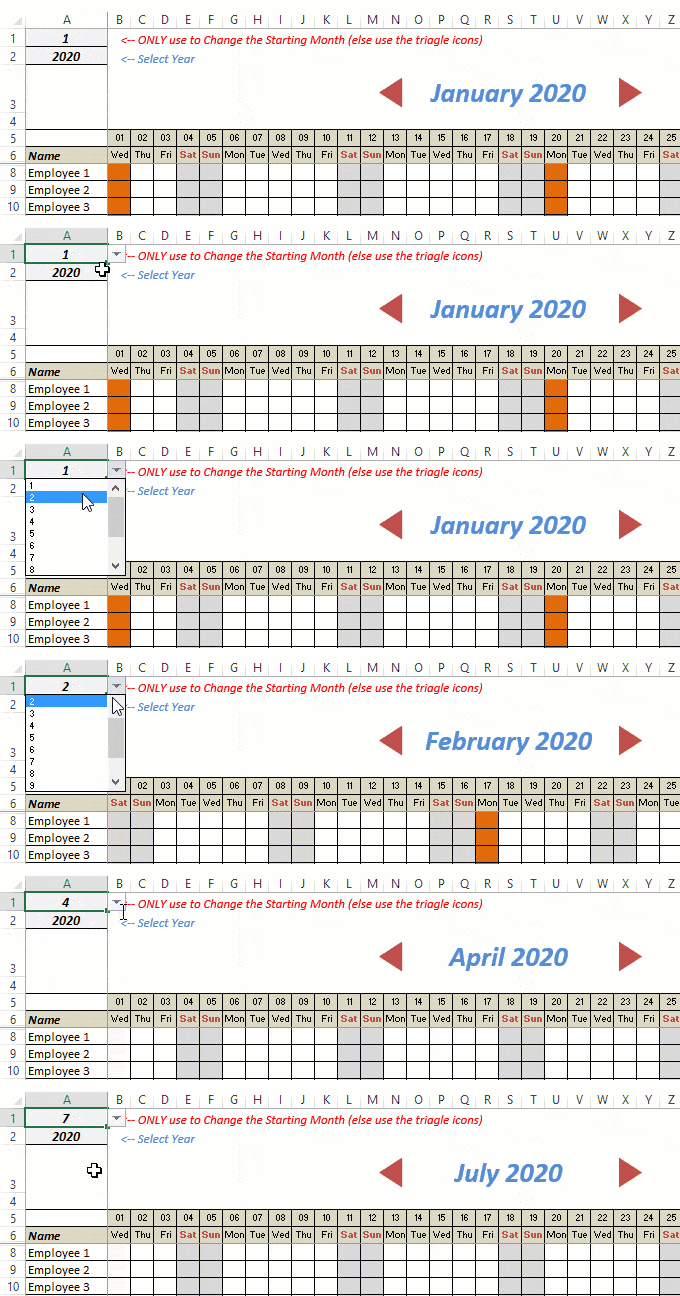
- This Excel template can be used to track leaves for over a year. You can select a start month and can track leaves for a year. For example, if you follow the April-March cycle, select April 2023 as the starting month.
- Note: The value in cell A1 is to change the time period of the leave tracker ONLY. DO NOT use Cell A1 to move to the next month while recording leaves. Use the triangle icons next to the month names to go to the next/previous month and mark leaves.

- You can specify the working days and non-working days (Weekends). At the right of the leave tracker, there is functionality to specify the working days by selecting Yes from the drop-down. If you select No, that day is marked as a non-working day in the leave tracker.
- As soon as you specify the non-working days, those weekdays get highlighted in gray color in the leave tracker.

- You can update the holiday list in the worksheet named “Holiday List”. It will automatically be reflected in the tracker by highlighting those days in Orange color.
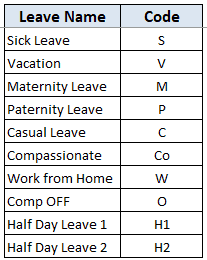
- To enter the leave record for employees, use the relevant codes based on the leave type (you can customize these leave codes). For example, in the case of sick leave, use S, in the case of Vacation, use V, as so on.
- There are two codes reserved for half-day leaves. you can enter H1 or H2 for a half-day leave.

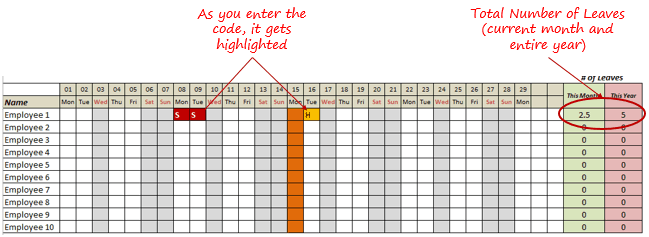
- As soon as you enter the leave code for any employee, it gets highlighted in red (in the case of half-day, it gets highlighted in yellow). If that day is a weekend or holiday, the color would not change.
- Column NJ (highlighted in green in the pic below) has the number of leaves of that employee in that month. It counts the leaves on working days only (those on weekends and/or holidays are not counted). Half-day leaves are counted as 0.5.
- UPDATED: Column NK (highlighted in light red in the pic below) has the number of annual leaves taken by an employee. It counts the leaves on working days only (those on weekends and/or holidays are not counted). Half-day leaves are counted as 0.5.
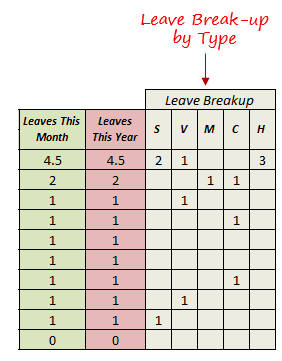
- Columns NL to NU gives the leave break-up by leave code (for the entire year). This could be helpful to keep a track of the type of leave that has been availed. Note that while Half Leaves are counted as .5 leaves in the total count, in the leave break-up, it is counted as whole numbers. For example, 2 half leaves would lead to 1 leave count, but you’ll see two half leaves in the leave breakup.
I have created this leave/attendance tracker template for 20 employees. If you want to add more, just copy-paste the formatting and formulas for additional rows.
Also, since there is a VBA code involved, make sure you always save it with .xls or .xlsm extension.
Download the Leave Tracker Template
Note: To update this template for any year, simply change the year value in cell A2. For example, to make it for 2017, just change the value in A2 to 2017. Also, you need to update the holiday list for the specified year.
The download file is completely unlocked so you can customize it to your needs.
Here is another version of the template that can track leaves for 50 employees.
Want to learn how to create awesome templates and dashboards? Check out the Excel Dashboard Course
FAQs on using this Leave Tracker Template
Since I created this vacation/leave tracker, I have been inundated with emails and comments. What you see now is a refined version that has been possible due to all the feedback that I have got.
Based on the questions I get repeatedly, I have created this FAQ section so that you can get an answer faster (instead of waiting for me to respond).
Here are the most common questions I get about the Leave tracker template:

Q: I tried downloading the file but it downloaded as a zip. How do I use it?
A: I have fixed this issue, and now you should be able to download the Excel file directly.

Q: When I change the month, the existing leaves are reflected in the changed month as well.
A: This happens when you use cell A1 to change the month. You need to use the arrow icons to change months. Cell A1 is to be used only to set the starting month of the calendar. For example, if you want the calendar to start from April, make cell A1 value 4. Now to move to March, use the triangle icons.

Q: I need to track multiple years of leaves. Do I need to create a new worksheet for each year (financial year)?
A: Yes! This leave tracker can only track leaves for a 12 month period. You need to create a copy for each year.

Q: Can I use my own leave codes?
A: Yes! You can change the leave code in cells NX8:NX17. You also need to specify the same code in cells NL5:NU5. For example, if you change the Work from Home leave code to X, you also need to change it in NR5.
I hope you find this leave/vacation tracker helpful.
Are there any other areas where you think an Excel template could be helpful? I am hungry for ideas and you are my gold mine. Do share your thoughts in the comments section 🙂
Related Excel Project Management Tutorials and Templates:

Amazing spreadsheet!!
Would it be possible to implement half-day Holidays on the holiday list? Thank would be very convenient!
THANKS!
I admire the spreadsheet created. However I have tried copying and pasting for the next year in the same sheet without it working – no doubt because of the referencing of the formulas. Is there a way to have multiple years shown here?
Hello, I have downloaded the spreadsheet but everytime i open it up it asks for the start date of the year repeatedly and I cannot go past the pop up box constantly coming back up. I have to force quite excel. Could you please tell me how to get round this?
Hi, we have different working days for different employees- Sunday to Thursday, Monday to Friday and Tuesday to Saturday. Is there any way we can configure the working days for each employee?
I’d like to do the same.
I wish there was a way to have some leave codes not add to the monthly/yearly totals. Not all our leave is chargeable. I tried to edit the code but it is way above my skill level. Even if I don’t edit the monthly/yearly cell and only select it and hit enter it gives the #VALUE error.
This would be very helpful! I would like to track employees who work from home but that isn’t technically a “leave”.
How can I have the calendar reflect holidays where the day before is a half day for all employees, i.e. Christmas Eve and New Years Eve? My company doesn’t normally give these as holidays but this year we are closing a half day. I want to make sure the employees are given only a half day for this day if they choose to take PTO during this time.
They could just use the half day code.
How can i change the “Leave This Month” and “Leave this year” formulas, so that only “Vacation” is counted as 1 and H1 and H2 as half but all else ignored?
Very good guidance !
My company allows for time to be taken in hourly increments, not just half or full days. it this template able to handle this or will I need to look for a different solution?
This is an awesome template. The only thing I am wondering if it’s possible is whether we can designate certain Holiday’s for certain employees. I work for President of an International Team so we have folks in Canada, Australia, Mexico and we are expanding into more countries. It would be great if I could somehow designate the different holiday’s by region for each person.
Hello – i have downloaded your Leave Tracker template and customised for x 33 employees for 2020. How do i print the document so that all x 12 months print please – in one go ? thank you.
Hi, can you create a template tracker for capital expenditures? Like monthly we will input the actual capital expenditure spent for the month, then we will do a re-forecast for the remaining months. Also, different sites with different list of capital expenditure projects (additional new projects may be added to the list as time goes by) also add complexity for monthly report use.
I need to count the text entered in Sunday’s & Holiday’s for Leaves. Please modify.
Hi this is a great tracker unfortunately my business has disabled the ability for macros to use – any ideas on how to use the template without the macros?
I’m having trouble with the Holidays. Some of the holidays are not off days for our company. But even when I remove those holidays on page 2, they still remain as days off on the tracker.
I have this same question. Did you manage to figure it out?
I deleted the row and it worked for me.
Very good guidance
In a seperate sheet, can I get the summary of leaves month wise for all the employees.
Here it shows month wise. I need the detail of leaves one year at one place.
How do I add additional Holiday’s. I tried to insert a sheet row but that didn’t work.
Hi can i add working on Saturday and my employee will get time in lieu for this
This is very helpful. Can you add a column after the “Leaves This Year” to count the total of Leaves they took on a holiday. Thank you!
I want to make the 2nd and 4th Saturday ass weekoffs.
Kindly suggest how to do that.
Hi! Great spreadsheet! How can I change the holiday year? Instead of starting from January to start from April. I have done it in Sheet3 but once I change it then the days are offset.
Thank you!
Hi! I absolutely LOVE what you’ve created! I’ve been playing around with this and think it’s amazing! I did have one question. I’m wanting to be able to track hours and not just half or full days off. I’ve been playing with the formulas and can’t seem to get it to work. Is there a way that you can have 0.1, 0.2, 0.3, 0.5, 0.6, 0.7 as codes for 1 to 7 hours off and have it calculate just like you did with the H1 and H2?
Can I change color codes for example annual leave green, sick leave not paid red, sick leave paid blue and maternity pink
You have to do that in the conditional formatting area.
how to mak all the full function can you provide video on that exel leave tracker
Hi,
Thank you very much for this.
I want to include “IN” and “OFF” on the days that employees are working and have off days but I do not want these to be counted when entered into the cells? How to exclude these so they are not counted in the leave totals? Thanks very much.
Hi I have 80 employees, please suggest how can i add more to track leaves template of 50 employees?
How do you add employees to the list? We have over 100 people on staff.
i really love and like your “Leave Tracker Template”, for now i create for custom but still used your template 95%, but mostly i would like to ask about how to make change Leave tracker into attendance mean i would like make your leave as attendance in a month, put NJ8 = NL8, but formula NJ8 same as NL8, so every month change will keep as many leave track/”as leave code” for now leave track count in a year! i wish i can send my file to you…
I want to remove half day leave from the excel sheet. How to modify the formula.
hi,
pls tell me how to update if any only one Sunday or Saturday working allotment
This works really well, except how do i edit the formula so that it does not deduct sickness and home working from your leave? If an employee gets 22 days holiday, I do not want the formula deducting leave when they work from home as this template seems to do that? I simply only want it to look at certain codes and deduct those eg vacation and half days.
Is it possible to do this?
I had a very similar question. Please let me know if you have an answer.
When I saved the tracker and then reopened it, the macros would not work. I tried resaving enabling macros and it still would not work. Suggestions?
Great Tool. Is there a way to create a summary of the tracking so you can see the whole year at once?
Hello,
This is very nice, but I am using SharePoint. It doesn’t allow for macros. You don’t have a version without the VB macro to move from month to month or ideas on how to create one without VB macro?
Regards,
Peter
macros work on our sharepoint
Thank you for the helpful leave tracker. One simple thing that can be done to faciliate customization is to use cell references in rows NL5:NU5, rather than hard-wired codes. Just have cell NL5, for example, =NX8; NL6 = NX9, etc.
Hey creator! i love this solution. however how can i only count leave labelled “V” and “H” whereas the rest are just indicating they are on “S” without adding to the total monthly and yearly leave?
I have this same question. Did you manage to figure it out?
How can I make the H1(half-day) column as 0.5 as well instead of 1?
This spreadsheet is awesome!!! I’ve made few tweaks to match our organization’s attendance policy. However, I now need to be able to see a detailed listing of missed days (and the type of missed days) for one individual at a time….a report of some type that can be printed and placed in an employee’s personnel file.
How can I do this?? I’ll be more than happy to share the current sheet I’m using.
Are you able to add a rolling total of holiday taken month on month so that you can see how many remaining days the employee has left, I’m not sure how to add this into a workbook that has macros (so what I need is annual entitlement, leave taken this month, leave remaining, so that it carriers across the entire year. If you have any advise it would be appreciated. Thank you
I got the same problem as well. Also, I would like to add one more column of the carry forward vacation days plus the total annual entitlement. Please advise.
how can i change the color when i enter codes into the cells. for instance i’d want Vacation cells to turn green and sick days red
Hi. how can I add 4 more columns after “Name” without messing up the formula?
Fabulous work. We just started using this. Hope it works for us well. Was simple to use but will know more once folks start to use it.
Hey this template is amazing. but i need further help. In our organisation, employee fiscal year is from the date of starting.. how do i do that for every employee. please help
Thank you so much ! I am loving it. Will you do a new one for 2020 ? please say yes 🙂
This is awesome! I created it on excel but was trying to convert it to Google Sheets. It doesn’t copy all the formats..etc. Any tips on how to get it to google Sheets?
Hello Ashley,
Did you get an answer to this?
The Excel Leave Tracker Template is wonderful, but One question – how do I change some of the values from 1/2 day to full day. I’m looking at the formula and have not yet figured it out. Any suggestions?
This is really useful, thanks. How do I change the colour so that each type of leave is a different colour?
How can I restrict access to view only when sharing with others
I would like to know this as well.
wow, thank you very much!